= Basic 3D Example
-click https://nyquistdev.net/git/?p=basic-3d-example.git;a=blob_plain;f=example.html;hb=HEAD"[here] for an interactive example
-
-A good explaination of how 3D works.
-
-NOTE: This started off as code from Tsoding, I used chatgpt to change
- specific things, and also made some of my own changes. This is a learning
- tool! not something I wrote off the top of my head
+++++
+<style>
+#game {
+ display: block;
+ margin: 0 auto;
+}
+</style>
-== Graphics Pipeline
+<canvas id="game"></canvas>
+<script src="https://nyquistdev.net/git/?p=basic-3d-example.git;a=blob_plain;f=index.js;hb=HEAD"></script>
+++++
-----
-vertex
- -> rotate cube
- -> translate cube (object position)
- -> apply camera (inverse transform)
- -> project
- -> screen
-----
+A good explaination how 3D works. If you click the cube you can change the axis
+it will rotate on.
-NOTE: Some parts of these pipeline may be left out if that part of the pipeline
- is not needed
+NOTE: This started off as code from Tsoding
-== Basic Projection Formula
+== Formulas
Projection formula for a vector latexmath:[[x,y,z]]:
\]
++++
-== Vertex Rotation Formulas
-click https://nyquistdev.net/git/?p=basic-3d-example.git;a=blob_plain;f=example.html;hb=refs/heads/simple-rotation[here] for an interactive example
-
Rotate vector formula for x-axis (y-z plane):
[latexmath]
\end{aligned} \]
++++
+
Rotate vector formula for z-axis (x-y plane):
[latexmath]
\]
++++
-== 2. Single-axis rotation matrices (Euler Angles)
-
-=== Rotation about X-axis (roll)
-
-[latexmath]
-++++
-\boxed{
-R_x(\alpha) =
-\begin{bmatrix}
-1 & 0 & 0 \\
-0 & \cos\alpha & -\sin\alpha \\
-0 & \sin\alpha & \cos\alpha
-\end{bmatrix}
-}
-++++
-
-=== Rotation about Y-axis (pitch)
-
-[latexmath]
-++++
-\boxed{
-R_y(\beta) =
-\begin{bmatrix}
-\cos\beta & 0 & \sin\beta \\
-0 & 1 & 0 \\
--\sin\beta & 0 & \cos\beta
-\end{bmatrix}
-}
-++++
-
-=== Rotation about Z-axis (yaw)
-
-[latexmath]
-++++
-\boxed{
-R_z(\gamma) =
-\begin{bmatrix}
-\cos\gamma & -\sin\gamma & 0 \\
-\sin\gamma & \cos\gamma & 0 \\
-0 & 0 & 1
-\end{bmatrix}
-}
-++++
-
-
-Euler angles will always have gimbal lock. You can switch which axis has gimbal
-lock by switching the order. Most application use quaternions instead of eular
-angles.
-
== Quaternions
-click https://nyquistdev.net/git/?p=basic-3d-example.git;a=blob_plain;f=example.html;hb=refs/heads/quaternions[here] for an interactive example
-
Quaternions allow you to rotate smoothly around multiple axes without gimbal
-lock. Chat-gpt rewrote the code to use quaternions. Here are some of the
-replys about https://nyquistdev.net/git/?p=basic-3d-example.git;a=blob_plain;f=docs/chatgpt-dump/quaternions.html;hb=HEAD[quaternions].
-
-=== 1. What is a quaternion (in graphics)?
-
-A quaternion is a 4-component number:
-
-[latexmath]
-++++
-q = (w, x, y, z)
-++++
-
-In 3D graphics, we use **unit quaternions** to represent **rotations**.
-
-A rotation by:
-
-* angle latexmath:[\theta]
-* around a **unit axis** latexmath:[\vec{u} = (u_x, u_y, u_z)]
-
-is encoded as:
-
-[latexmath]
-++++
-\boxed{
-q = \left(
-\cos\frac{\theta}{2},
-\; u_x \sin\frac{\theta}{2},
-\; u_y \sin\frac{\theta}{2},
-\; u_z \sin\frac{\theta}{2}
-\right)
-}
-++++
-
-This is the **axis–angle -> quaternion** formula.
-
-==== Why half-angle?
-Because quaternion rotation comes from complex numbers and Euler’s formula —
-doubling happens naturally in the math.
-
-=== 2. quatFromAxisAngle
-
-[source, js]
-----
-function quatFromAxisAngle(axis, angle) {
- const h = angle / 2;
- const s = Math.sin(h);
- return [Math.cos(h), axis.x*s, axis.y*s, axis.z*s];
-}
-----
-
-You’re directly implementing:
-
-[latexmath]
-++++
-q = (\cos(\theta/2), \vec{u}\sin(\theta/2))
-++++
-
-* latexmath:[h = angle / 2] -> half-angle
-* latexmath:[cos(h)] → scalar part (w)
-* latexmath:[axis * sin(h)] → vector part latexmath:[(x,y,z)]
-
-IMPORTANT: `axis` **must be normalized** (length = 1), otherwise rotation will
- scale or skew.
-
-=== 3. Quaternion multiplication (rotation composition)
-
-[source, js]
-----
-function quatMultiply(a, b) {
- const [w1,x1,y1,z1] = a;
- const [w2,x2,y2,z2] = b;
- return [
- w1*w2 - x1*x2 - y1*y2 - z1*z2,
- w1*x2 + x1*w2 + y1*z2 - z1*y2,
- w1*y2 - x1*z2 + y1*w2 + z1*x2,
- w1*z2 + x1*y2 - y1*x2 + z1*w2
- ];
-}
-----
-
-formula:
-
-[latexmath]
-++++
-q_1 = (w_1, \vec{v}_1), \quad q_2 = (w_2, \vec{v}_2)
-++++
-
-Quaternion multiplication is:
-
-[latexmath]
-++++
-\boxed{
-q_1 q_2 =
-\left(
-w_1 w_2 - \vec{v}_1 \cdot \vec{v}_2,\;
-w_1 \vec{v}_2 + w_2 \vec{v}_1 + \vec{v}_1 \times \vec{v}_2
-\right)
-}
-++++
-
-Expanded component-wise -> exactly your code.
-
-==== Why this matters
-
-* Quaternion multiplication **combines rotations**
-* Order matters:
-
-[latexmath]
-++++
-q_{\text{final}} = q_{\text{new}} \cdot q_{\text{current}}
-++++
-
-This avoids **gimbal lock**, unlike Euler angles.
-
-=== 4. Quaternion conjugate
-
-[source, js]
-----
-function quatConjugate(q) {
- return [q[0], -q[1], -q[2], -q[3]];
-}
-----
-
-For:
-
-[latexmath]
-++++
-q = (w, x, y, z)
-++++
-
-The conjugate is:
-
-[latexmath]
-++++
-\boxed{
-q^* = (w, -x, -y, -z)
-}
-++++
-
-=== Why this works
-
-If (q) is a **unit quaternion**:
-
-[latexmath]
-++++
-q^{-1} = q^*
-++++
-
-So conjugate = **inverse rotation**.
-
-This is why cameras use conjugates — moving the world opposite to the camera
-rotation.
-
-=== 5. Rotating a vector using quaternions
-
-[source, js]
-----
-function quatRotateVector(q, v) {
- const qv = [0, v.x, v.y, v.z];
- const r = quatMultiply(quatMultiply(q, qv), quatConjugate(q));
- return { x: r[1], y: r[2], z: r[3] };
-}
-----
-
-The key formula
-
-To rotate a vector latexmath:[\vec{v}]:
-
-1. Convert it to a **pure quaternion**
-
-[latexmath]
-++++
-v_q = (0, v_x, v_y, v_z)
-++++
-
-2. Apply:
-
-[latexmath]
-++++
-\boxed{
-v' = q \; v_q \; q^{-1}
-}
-++++
-
-3. Extract the vector part
-
-==== Why this works
-
-Quaternion rotation encodes:
-
-* axis
-* angle
-* orientation
-
-The sandwich product rotates without:
-
-* scaling
-* skewing
-* drifting
-
-=== Visual intuition
-
-A rotation quaternion represents:
-
-[latexmath]
-++++
-q = \cos(\theta/2) + \sin(\theta/2)(u_x i + u_y j + u_z k)
-++++
-
-This is the 3D analog of:
-
-[latexmath]
-++++
-e^{i\theta} = \cos\theta + i\sin\theta
-++++
-
-== Camera
-
-chat-gpt replys about https://nyquistdev.net/git/?p=basic-3d-example.git;a=blob_plain;f=docs/chatgpt-dump/camera.html;hb=HEAD[camera].
-
-== Simple clickable object
-
-click https://nyquistdev.net/git/?p=basic-3d-example.git;a=blob_plain;f=example.html;hb=refs/heads/clickable[here] for an interactive example
-
-This does not account for the rotation of the object but it does check to see if
-your mouse is within the rectangular bounds of the mesh.
-
-1. finding the min and max values for x and y of the mesh:
-
-[source, js]
-----
-function computeBounds(mesh) {
- let min = {x: Infinity, y: Infinity}
- let max = {x: -Infinity, y: -Infinity}
-
- for (const v of mesh) {
- min.x = Math.min(min.x, v.x)
- min.y = Math.min(min.y, v.y)
-
- max.x = Math.max(max.x, v.x)
- max.y = Math.max(max.y, v.y)
- }
- return {min, max}
-}
-----
-
-2. Define the box corners of the rect for the mesh
-
-[source, js]
-----
-function boundingBoxCorners({min, max}) {
- return {
- bottom: {left: {x: min.x, y: max.y}, right: {x: max.x, y: max.y}},
- top: {left: {x: min.x, y: min.y}, right: {x: max.x, y: min.y}},
-
- }
-}
-----
-
-3. Check to see if the mouse is in the rect in the game loop. If it is, and the
- mouse button is down, then you can move the object
-
-[source, js]
-----
-inObject = (
- mousePos.x > rect.top.left.x
- &&
- mousePos.x < rect.top.right.x
- &&
- mousePos.y > rect.top.left.y
- &&
- mousePos.y < rect.bottom.right.y
-)
-
-if (mouseDown && inObject) canMoveObject = true
+lock.
-if (!mouseDown) canMoveObject = false
-----
+== ChatGpt
+for my chatGpt Responses checkout my https://nyquistdev.net/git/?p=basic-3d-example.git;a=tree;f=docs/chatgpt-dump/docs;h=60b7a07cb968290e6068fc7e5f52dfd9e16a06e0;hb=HEAD[chatgpt-dumps].
== Links
* https://www.youtube.com/watch?v=qjWkNZ0SXfo[One Formula That demystifies 3D Graphics]
* https://www.youtube.com/watch?v=EZufiIwwqFA[Rotation matrix derivation (step-by-step prove)]
* https://matthew-brett.github.io/teaching/rotation_2d.html[rotation 2D by mathew]
-* https://www.youtube.com/watch?v=zc8b2Jo7mno[gimbal lock visual representation]
-* https://www.youtube.com/watch?v=zjMuIxRvygQ[3Blue1Brown | Quaternions and 3d rotation, explained interactively]
-* https://www.youtube.com/watch?v=d4EgbgTm0Bg&t=17s[3Blue1Brown | Visualizing the 4d numbers Quanternions]
-* https://phas.ubc.ca/~berciu/TEACHING/PHYS206/LECTURES/FILES/euler.pdf[euler.pdf]
#!/usr/bin/env bash
-set -e
-
-PANDOC_OPTS=(
- --from markdown+smart
- --to html
- --standalone
- --metadata charset=utf-8
- --mathjax
-)
-
-for md in *.md; do
- html="${md%.md}.html"
- pandoc "$md" "${PANDOC_OPTS[@]}" -o "$html" --mathjax
-done
+pandoc -s quaternions.md -o quaternions.html
margin: 0 0.8em 0.2em -1.6em;
vertical-align: middle;
}
+ .display.math{display: block; text-align: center; margin: 0.5rem auto;}
/* CSS for syntax highlighting */
pre > code.sourceCode { white-space: pre; position: relative; }
pre > code.sourceCode > span { line-height: 1.25; }
quaternions</strong>, so the cube rotates smoothly around multiple axes
and keeps your click-to-change-axis feature.</p>
<p>Do you want me to do that?</p>
-<p>Absolutely! Let’s go through your <strong>quaternion-based 3D cube
-code</strong> line by line. I’ll break it down into sections so it’s
-easier to digest.</p>
-<hr />
-<h2 id="canvas-setup"><strong>1. Canvas Setup</strong></h2>
-<div class="sourceCode" id="cb5"><pre class="sourceCode js"><code class="sourceCode javascript"><span id="cb5-1"><a href="#cb5-1" aria-hidden="true" tabindex="-1"></a><span class="kw">const</span> game <span class="op">=</span> <span class="bu">document</span><span class="op">.</span><span class="fu">getElementById</span>(<span class="st">"game"</span>)<span class="op">;</span></span>
-<span id="cb5-2"><a href="#cb5-2" aria-hidden="true" tabindex="-1"></a>game<span class="op">.</span><span class="at">width</span> <span class="op">=</span> <span class="dv">400</span><span class="op">;</span></span>
-<span id="cb5-3"><a href="#cb5-3" aria-hidden="true" tabindex="-1"></a>game<span class="op">.</span><span class="at">height</span> <span class="op">=</span> <span class="dv">400</span><span class="op">;</span></span></code></pre></div>
-<ul>
-<li>Gets the <code><canvas></code> element with ID
-<code>game</code>.</li>
-<li>Sets the canvas dimensions to 400×400 pixels.</li>
-</ul>
-<div class="sourceCode" id="cb6"><pre class="sourceCode js"><code class="sourceCode javascript"><span id="cb6-1"><a href="#cb6-1" aria-hidden="true" tabindex="-1"></a><span class="kw">const</span> BACKGROUND <span class="op">=</span> <span class="st">"#101010"</span><span class="op">;</span></span>
-<span id="cb6-2"><a href="#cb6-2" aria-hidden="true" tabindex="-1"></a><span class="kw">const</span> FOREGROUND <span class="op">=</span> <span class="st">"#50FF50"</span><span class="op">;</span></span>
-<span id="cb6-3"><a href="#cb6-3" aria-hidden="true" tabindex="-1"></a><span class="kw">const</span> TEXT <span class="op">=</span> <span class="st">"#FFFFFF"</span><span class="op">;</span></span></code></pre></div>
-<ul>
-<li>Defines colors for background, cube lines, and text.</li>
-</ul>
-<div class="sourceCode" id="cb7"><pre class="sourceCode js"><code class="sourceCode javascript"><span id="cb7-1"><a href="#cb7-1" aria-hidden="true" tabindex="-1"></a><span class="kw">const</span> ctx <span class="op">=</span> game<span class="op">.</span><span class="fu">getContext</span>(<span class="st">"2d"</span>)<span class="op">;</span></span></code></pre></div>
-<ul>
-<li>Gets the 2D drawing context so we can draw shapes on the
-canvas.</li>
-</ul>
-<hr />
-<h2 id="cube-geometry"><strong>2. Cube Geometry</strong></h2>
-<div class="sourceCode" id="cb8"><pre class="sourceCode js"><code class="sourceCode javascript"><span id="cb8-1"><a href="#cb8-1" aria-hidden="true" tabindex="-1"></a><span class="kw">const</span> vs <span class="op">=</span> [ <span class="op">...</span> ]<span class="op">;</span></span></code></pre></div>
-<ul>
-<li><code>vs</code> = <strong>vertices</strong> of a cube (8
-points).</li>
-<li>Each vertex has <code>x, y, z</code> coordinates in 3D space (values
-between -0.25 and 0.25).</li>
-</ul>
-<div class="sourceCode" id="cb9"><pre class="sourceCode js"><code class="sourceCode javascript"><span id="cb9-1"><a href="#cb9-1" aria-hidden="true" tabindex="-1"></a><span class="kw">const</span> fs <span class="op">=</span> [ <span class="op">...</span> ]<span class="op">;</span></span></code></pre></div>
-<ul>
-<li><code>fs</code> = <strong>faces/edges</strong> to connect
-vertices.</li>
-<li>Some are quads <code>[0,1,2,3]</code>, some are edges
-<code>[0,4]</code>.</li>
-<li>This tells the code <strong>which points to draw lines
-between</strong>.</li>
-</ul>
-<div class="sourceCode" id="cb10"><pre
-class="sourceCode js"><code class="sourceCode javascript"><span id="cb10-1"><a href="#cb10-1" aria-hidden="true" tabindex="-1"></a><span class="kw">let</span> dz <span class="op">=</span> <span class="dv">1</span><span class="op">;</span></span>
-<span id="cb10-2"><a href="#cb10-2" aria-hidden="true" tabindex="-1"></a><span class="kw">let</span> angle <span class="op">=</span> <span class="dv">0</span><span class="op">;</span></span>
-<span id="cb10-3"><a href="#cb10-3" aria-hidden="true" tabindex="-1"></a><span class="kw">let</span> activeAxes <span class="op">=</span> [<span class="st">"x"</span>]<span class="op">;</span></span></code></pre></div>
-<ul>
-<li><code>dz</code>: distance to move the cube along Z (so it’s in front
-of the camera).</li>
-<li><code>angle</code>: current rotation angle.</li>
-<li><code>activeAxes</code>: which axes to rotate around (initially just
-<code>x</code>).</li>
-</ul>
-<hr />
-<h2 id="quaternion-functions"><strong>3. Quaternion
-Functions</strong></h2>
-<p><strong>a. Create a quaternion from an axis + angle</strong></p>
-<div class="sourceCode" id="cb11"><pre
-class="sourceCode js"><code class="sourceCode javascript"><span id="cb11-1"><a href="#cb11-1" aria-hidden="true" tabindex="-1"></a><span class="kw">function</span> <span class="fu">quatFromAxisAngle</span>(axis<span class="op">,</span> angle) {</span>
-<span id="cb11-2"><a href="#cb11-2" aria-hidden="true" tabindex="-1"></a> <span class="kw">const</span> half <span class="op">=</span> angle <span class="op">/</span> <span class="dv">2</span><span class="op">;</span></span>
-<span id="cb11-3"><a href="#cb11-3" aria-hidden="true" tabindex="-1"></a> <span class="kw">const</span> s <span class="op">=</span> <span class="bu">Math</span><span class="op">.</span><span class="fu">sin</span>(half)<span class="op">;</span></span>
-<span id="cb11-4"><a href="#cb11-4" aria-hidden="true" tabindex="-1"></a> <span class="cf">return</span> [</span>
-<span id="cb11-5"><a href="#cb11-5" aria-hidden="true" tabindex="-1"></a> <span class="bu">Math</span><span class="op">.</span><span class="fu">cos</span>(half)<span class="op">,</span> <span class="co">// w</span></span>
-<span id="cb11-6"><a href="#cb11-6" aria-hidden="true" tabindex="-1"></a> axis<span class="op">.</span><span class="at">x</span> <span class="op">*</span> s<span class="op">,</span> <span class="co">// x</span></span>
-<span id="cb11-7"><a href="#cb11-7" aria-hidden="true" tabindex="-1"></a> axis<span class="op">.</span><span class="at">y</span> <span class="op">*</span> s<span class="op">,</span> <span class="co">// y</span></span>
-<span id="cb11-8"><a href="#cb11-8" aria-hidden="true" tabindex="-1"></a> axis<span class="op">.</span><span class="at">z</span> <span class="op">*</span> s <span class="co">// z</span></span>
-<span id="cb11-9"><a href="#cb11-9" aria-hidden="true" tabindex="-1"></a> ]<span class="op">;</span></span>
-<span id="cb11-10"><a href="#cb11-10" aria-hidden="true" tabindex="-1"></a>}</span></code></pre></div>
-<ul>
-<li>Converts <strong>axis-angle rotation</strong> into a quaternion
-<code>[w, x, y, z]</code>.</li>
-<li><code>half</code> = half the rotation angle.</li>
-<li><code>s = sin(half)</code> scales the axis.</li>
-<li><code>w</code> = cos(half).</li>
-</ul>
-<p><strong>b. Multiply two quaternions</strong></p>
-<div class="sourceCode" id="cb12"><pre
-class="sourceCode js"><code class="sourceCode javascript"><span id="cb12-1"><a href="#cb12-1" aria-hidden="true" tabindex="-1"></a><span class="kw">function</span> <span class="fu">quatMultiply</span>(q1<span class="op">,</span> q2) { <span class="op">...</span> }</span></code></pre></div>
-<ul>
-<li>Standard quaternion multiplication formula.</li>
-<li>Combines two rotations into one. <strong>Order matters!</strong>
-<code>q1*q2</code> rotates q2 first, then q1.</li>
-</ul>
-<p><strong>c. Rotate a vector by a quaternion</strong></p>
-<div class="sourceCode" id="cb13"><pre
-class="sourceCode js"><code class="sourceCode javascript"><span id="cb13-1"><a href="#cb13-1" aria-hidden="true" tabindex="-1"></a><span class="kw">function</span> <span class="fu">quatRotateVector</span>(q<span class="op">,</span> v) { <span class="op">...</span> }</span></code></pre></div>
-<ul>
-<li><p>Rotates a 3D vector <code>v</code> using quaternion
-<code>q</code>.</p></li>
-<li><p>Steps:</p>
-<ol type="1">
-<li>Convert vector to quaternion <code>qv = [0, vx, vy, vz]</code>.</li>
-<li>Compute conjugate <code>qConj = [w, -x, -y, -z]</code>.</li>
-<li>Rotate: <code>v' = q * qv * q⁻¹</code>.</li>
-<li>Return new <code>x,y,z</code> of rotated vector.</li>
-</ol></li>
-</ul>
-<hr />
-<h2 id="drawing-functions"><strong>4. Drawing Functions</strong></h2>
-<p><strong>Clear canvas and draw text</strong></p>
-<div class="sourceCode" id="cb14"><pre
-class="sourceCode js"><code class="sourceCode javascript"><span id="cb14-1"><a href="#cb14-1" aria-hidden="true" tabindex="-1"></a><span class="kw">function</span> <span class="fu">clear</span>() {</span>
-<span id="cb14-2"><a href="#cb14-2" aria-hidden="true" tabindex="-1"></a> ctx<span class="op">.</span><span class="at">fillStyle</span> <span class="op">=</span> BACKGROUND<span class="op">;</span></span>
-<span id="cb14-3"><a href="#cb14-3" aria-hidden="true" tabindex="-1"></a> ctx<span class="op">.</span><span class="fu">fillRect</span>(<span class="dv">0</span><span class="op">,</span> <span class="dv">0</span><span class="op">,</span> game<span class="op">.</span><span class="at">width</span><span class="op">,</span> game<span class="op">.</span><span class="at">height</span>)<span class="op">;</span></span>
-<span id="cb14-4"><a href="#cb14-4" aria-hidden="true" tabindex="-1"></a> ctx<span class="op">.</span><span class="at">fillStyle</span> <span class="op">=</span> TEXT<span class="op">;</span></span>
-<span id="cb14-5"><a href="#cb14-5" aria-hidden="true" tabindex="-1"></a> ctx<span class="op">.</span><span class="at">font</span> <span class="op">=</span> <span class="st">"20px serif"</span><span class="op">;</span></span>
-<span id="cb14-6"><a href="#cb14-6" aria-hidden="true" tabindex="-1"></a> ctx<span class="op">.</span><span class="fu">fillText</span>(<span class="st">" *click me to change rotation axes"</span><span class="op">,</span> <span class="dv">10</span><span class="op">,</span> game<span class="op">.</span><span class="at">height</span> <span class="op">-</span> <span class="dv">15</span>)<span class="op">;</span></span>
-<span id="cb14-7"><a href="#cb14-7" aria-hidden="true" tabindex="-1"></a> ctx<span class="op">.</span><span class="fu">fillText</span>(<span class="st">"current axes: "</span> <span class="op">+</span> activeAxes<span class="op">.</span><span class="fu">join</span>(<span class="st">","</span>)<span class="op">,</span> <span class="dv">10</span><span class="op">,</span> <span class="dv">20</span>)<span class="op">;</span></span>
-<span id="cb14-8"><a href="#cb14-8" aria-hidden="true" tabindex="-1"></a>}</span></code></pre></div>
-<ul>
-<li>Clears the canvas with the background color.</li>
-<li>Draws instructions and current axes at the top/bottom.</li>
-</ul>
-<p><strong>Draw a point</strong></p>
-<div class="sourceCode" id="cb15"><pre
-class="sourceCode js"><code class="sourceCode javascript"><span id="cb15-1"><a href="#cb15-1" aria-hidden="true" tabindex="-1"></a><span class="kw">function</span> <span class="fu">point</span>({x<span class="op">,</span> y}) {</span>
-<span id="cb15-2"><a href="#cb15-2" aria-hidden="true" tabindex="-1"></a> <span class="kw">const</span> s <span class="op">=</span> <span class="dv">20</span><span class="op">;</span></span>
-<span id="cb15-3"><a href="#cb15-3" aria-hidden="true" tabindex="-1"></a> ctx<span class="op">.</span><span class="at">fillStyle</span> <span class="op">=</span> FOREGROUND<span class="op">;</span></span>
-<span id="cb15-4"><a href="#cb15-4" aria-hidden="true" tabindex="-1"></a> ctx<span class="op">.</span><span class="fu">fillRect</span>(x <span class="op">-</span> s<span class="op">/</span><span class="dv">2</span><span class="op">,</span> y <span class="op">-</span> s<span class="op">/</span><span class="dv">2</span><span class="op">,</span> s<span class="op">,</span> s)<span class="op">;</span></span>
-<span id="cb15-5"><a href="#cb15-5" aria-hidden="true" tabindex="-1"></a>}</span></code></pre></div>
-<ul>
-<li>Draws a small square at <code>(x, y)</code> on the screen.</li>
-<li>Not used in the final version, but useful for debugging
-vertices.</li>
-</ul>
-<p><strong>Draw a line</strong></p>
-<div class="sourceCode" id="cb16"><pre
-class="sourceCode js"><code class="sourceCode javascript"><span id="cb16-1"><a href="#cb16-1" aria-hidden="true" tabindex="-1"></a><span class="kw">function</span> <span class="fu">line</span>(p1<span class="op">,</span> p2) { <span class="op">...</span> }</span></code></pre></div>
-<ul>
-<li>Draws a thick line from <code>p1</code> to <code>p2</code> in canvas
-coordinates.</li>
-</ul>
-<p><strong>Convert 3D to screen coordinates</strong></p>
-<div class="sourceCode" id="cb17"><pre
-class="sourceCode js"><code class="sourceCode javascript"><span id="cb17-1"><a href="#cb17-1" aria-hidden="true" tabindex="-1"></a><span class="kw">function</span> <span class="fu">screen</span>(p) {</span>
-<span id="cb17-2"><a href="#cb17-2" aria-hidden="true" tabindex="-1"></a> <span class="cf">return</span> {</span>
-<span id="cb17-3"><a href="#cb17-3" aria-hidden="true" tabindex="-1"></a> <span class="dt">x</span><span class="op">:</span> (p<span class="op">.</span><span class="at">x</span> <span class="op">+</span> <span class="dv">1</span>)<span class="op">/</span><span class="dv">2</span> <span class="op">*</span> game<span class="op">.</span><span class="at">width</span><span class="op">,</span></span>
-<span id="cb17-4"><a href="#cb17-4" aria-hidden="true" tabindex="-1"></a> <span class="dt">y</span><span class="op">:</span> (<span class="dv">1</span> <span class="op">-</span>(p<span class="op">.</span><span class="at">y</span> <span class="op">+</span> <span class="dv">1</span>)<span class="op">/</span><span class="dv">2</span>) <span class="op">*</span> game<span class="op">.</span><span class="at">height</span></span>
-<span id="cb17-5"><a href="#cb17-5" aria-hidden="true" tabindex="-1"></a> }<span class="op">;</span></span>
-<span id="cb17-6"><a href="#cb17-6" aria-hidden="true" tabindex="-1"></a>}</span></code></pre></div>
-<ul>
-<li>Maps normalized coordinates <code>[-1,1]</code> to screen
-coordinates <code>[0, width/height]</code>.</li>
-<li>Y-axis is flipped because canvas y=0 is top.</li>
-</ul>
-<p><strong>Project 3D to 2D</strong></p>
-<div class="sourceCode" id="cb18"><pre
-class="sourceCode js"><code class="sourceCode javascript"><span id="cb18-1"><a href="#cb18-1" aria-hidden="true" tabindex="-1"></a><span class="kw">function</span> <span class="fu">project</span>({x<span class="op">,</span> y<span class="op">,</span> z}) {</span>
-<span id="cb18-2"><a href="#cb18-2" aria-hidden="true" tabindex="-1"></a> <span class="cf">return</span> { <span class="dt">x</span><span class="op">:</span> x<span class="op">/</span>z<span class="op">,</span> <span class="dt">y</span><span class="op">:</span> y<span class="op">/</span>z }<span class="op">;</span></span>
-<span id="cb18-3"><a href="#cb18-3" aria-hidden="true" tabindex="-1"></a>}</span></code></pre></div>
-<ul>
-<li>Simple <strong>perspective projection</strong>: divides x and y by z
-(makes things farther away appear smaller).</li>
-</ul>
-<p><strong>Translate along Z</strong></p>
-<div class="sourceCode" id="cb19"><pre
-class="sourceCode js"><code class="sourceCode javascript"><span id="cb19-1"><a href="#cb19-1" aria-hidden="true" tabindex="-1"></a><span class="kw">function</span> <span class="fu">translateZ</span>({x<span class="op">,</span>y<span class="op">,</span>z}<span class="op">,</span> dz) {</span>
-<span id="cb19-2"><a href="#cb19-2" aria-hidden="true" tabindex="-1"></a> <span class="cf">return</span> {x<span class="op">,</span> y<span class="op">,</span> <span class="dt">z</span><span class="op">:</span> z <span class="op">+</span> dz}<span class="op">;</span></span>
-<span id="cb19-3"><a href="#cb19-3" aria-hidden="true" tabindex="-1"></a>}</span></code></pre></div>
-<ul>
-<li>Moves the cube forward/backward so it appears in front of the
-camera.</li>
-</ul>
-<hr />
-<h2 id="animation-loop"><strong>5. Animation Loop</strong></h2>
-<div class="sourceCode" id="cb20"><pre
-class="sourceCode js"><code class="sourceCode javascript"><span id="cb20-1"><a href="#cb20-1" aria-hidden="true" tabindex="-1"></a><span class="kw">const</span> FPS <span class="op">=</span> <span class="dv">60</span><span class="op">;</span></span>
-<span id="cb20-2"><a href="#cb20-2" aria-hidden="true" tabindex="-1"></a></span>
-<span id="cb20-3"><a href="#cb20-3" aria-hidden="true" tabindex="-1"></a><span class="kw">function</span> <span class="fu">frame</span>() {</span>
-<span id="cb20-4"><a href="#cb20-4" aria-hidden="true" tabindex="-1"></a> <span class="kw">const</span> dt <span class="op">=</span> <span class="dv">1</span><span class="op">/</span>FPS<span class="op">;</span></span>
-<span id="cb20-5"><a href="#cb20-5" aria-hidden="true" tabindex="-1"></a> angle <span class="op">+=</span> <span class="bu">Math</span><span class="op">.</span><span class="cn">PI</span><span class="op">*</span>dt<span class="op">;</span></span></code></pre></div>
-<ul>
-<li>Updates rotation angle every frame based on FPS.</li>
-</ul>
-<p><strong>Create combined quaternion</strong></p>
-<div class="sourceCode" id="cb21"><pre
-class="sourceCode js"><code class="sourceCode javascript"><span id="cb21-1"><a href="#cb21-1" aria-hidden="true" tabindex="-1"></a> <span class="kw">let</span> q <span class="op">=</span> [<span class="dv">1</span><span class="op">,</span><span class="dv">0</span><span class="op">,</span><span class="dv">0</span><span class="op">,</span><span class="dv">0</span>]<span class="op">;</span> <span class="co">// identity quaternion</span></span>
-<span id="cb21-2"><a href="#cb21-2" aria-hidden="true" tabindex="-1"></a> activeAxes<span class="op">.</span><span class="fu">forEach</span>(axis <span class="kw">=></span> {</span>
-<span id="cb21-3"><a href="#cb21-3" aria-hidden="true" tabindex="-1"></a> <span class="kw">let</span> qAxis<span class="op">;</span></span>
-<span id="cb21-4"><a href="#cb21-4" aria-hidden="true" tabindex="-1"></a> <span class="cf">if</span> (axis <span class="op">===</span> <span class="st">"x"</span>) qAxis <span class="op">=</span> <span class="fu">quatFromAxisAngle</span>({<span class="dt">x</span><span class="op">:</span><span class="dv">1</span><span class="op">,</span><span class="dt">y</span><span class="op">:</span><span class="dv">0</span><span class="op">,</span><span class="dt">z</span><span class="op">:</span><span class="dv">0</span>}<span class="op">,</span> angle)<span class="op">;</span></span>
-<span id="cb21-5"><a href="#cb21-5" aria-hidden="true" tabindex="-1"></a> <span class="cf">if</span> (axis <span class="op">===</span> <span class="st">"y"</span>) qAxis <span class="op">=</span> <span class="fu">quatFromAxisAngle</span>({<span class="dt">x</span><span class="op">:</span><span class="dv">0</span><span class="op">,</span><span class="dt">y</span><span class="op">:</span><span class="dv">1</span><span class="op">,</span><span class="dt">z</span><span class="op">:</span><span class="dv">0</span>}<span class="op">,</span> angle)<span class="op">;</span></span>
-<span id="cb21-6"><a href="#cb21-6" aria-hidden="true" tabindex="-1"></a> <span class="cf">if</span> (axis <span class="op">===</span> <span class="st">"z"</span>) qAxis <span class="op">=</span> <span class="fu">quatFromAxisAngle</span>({<span class="dt">x</span><span class="op">:</span><span class="dv">0</span><span class="op">,</span><span class="dt">y</span><span class="op">:</span><span class="dv">0</span><span class="op">,</span><span class="dt">z</span><span class="op">:</span><span class="dv">1</span>}<span class="op">,</span> angle)<span class="op">;</span></span>
-<span id="cb21-7"><a href="#cb21-7" aria-hidden="true" tabindex="-1"></a> q <span class="op">=</span> <span class="fu">quatMultiply</span>(qAxis<span class="op">,</span> q)<span class="op">;</span> <span class="co">// multiply in order</span></span>
-<span id="cb21-8"><a href="#cb21-8" aria-hidden="true" tabindex="-1"></a> })<span class="op">;</span></span></code></pre></div>
-<ul>
-<li>Starts with <strong>identity quaternion</strong> (no rotation).</li>
-<li>For each active axis, creates a quaternion for rotation around that
-axis.</li>
-<li>Combines them by multiplying — this lets the cube rotate around
-multiple axes <strong>simultaneously</strong>.</li>
-</ul>
-<p><strong>Draw the cube</strong></p>
-<div class="sourceCode" id="cb22"><pre
-class="sourceCode js"><code class="sourceCode javascript"><span id="cb22-1"><a href="#cb22-1" aria-hidden="true" tabindex="-1"></a> <span class="fu">clear</span>()<span class="op">;</span></span>
-<span id="cb22-2"><a href="#cb22-2" aria-hidden="true" tabindex="-1"></a> <span class="cf">for</span> (<span class="kw">const</span> f <span class="kw">of</span> fs) {</span>
-<span id="cb22-3"><a href="#cb22-3" aria-hidden="true" tabindex="-1"></a> <span class="cf">for</span> (<span class="kw">let</span> i <span class="op">=</span> <span class="dv">0</span><span class="op">;</span> i <span class="op"><</span> f<span class="op">.</span><span class="at">length</span><span class="op">;</span> <span class="op">++</span>i) {</span>
-<span id="cb22-4"><a href="#cb22-4" aria-hidden="true" tabindex="-1"></a> <span class="kw">const</span> a <span class="op">=</span> vs[f[i]]<span class="op">;</span></span>
-<span id="cb22-5"><a href="#cb22-5" aria-hidden="true" tabindex="-1"></a> <span class="kw">const</span> b <span class="op">=</span> vs[f[(i <span class="op">+</span> <span class="dv">1</span>)<span class="op">%</span>f<span class="op">.</span><span class="at">length</span>]]<span class="op">;</span></span>
-<span id="cb22-6"><a href="#cb22-6" aria-hidden="true" tabindex="-1"></a> <span class="fu">line</span>(</span>
-<span id="cb22-7"><a href="#cb22-7" aria-hidden="true" tabindex="-1"></a> <span class="bu">screen</span>(<span class="fu">project</span>(<span class="fu">translateZ</span>(<span class="fu">quatRotateVector</span>(q<span class="op">,</span> a)<span class="op">,</span> dz)))<span class="op">,</span></span>
-<span id="cb22-8"><a href="#cb22-8" aria-hidden="true" tabindex="-1"></a> <span class="bu">screen</span>(<span class="fu">project</span>(<span class="fu">translateZ</span>(<span class="fu">quatRotateVector</span>(q<span class="op">,</span> b)<span class="op">,</span> dz)))</span>
-<span id="cb22-9"><a href="#cb22-9" aria-hidden="true" tabindex="-1"></a> )<span class="op">;</span></span>
-<span id="cb22-10"><a href="#cb22-10" aria-hidden="true" tabindex="-1"></a> }</span>
-<span id="cb22-11"><a href="#cb22-11" aria-hidden="true" tabindex="-1"></a> }</span></code></pre></div>
-<ul>
-<li>Clears the canvas.</li>
-<li>Loops through each face/edge <code>f</code>.</li>
-<li>Rotates each vertex using the combined quaternion.</li>
-<li>Translates it forward along Z.</li>
-<li>Projects 3D coordinates into 2D screen coordinates.</li>
-<li>Draws lines connecting vertices.</li>
-</ul>
-<p><strong>Schedule next frame</strong></p>
-<div class="sourceCode" id="cb23"><pre
-class="sourceCode js"><code class="sourceCode javascript"><span id="cb23-1"><a href="#cb23-1" aria-hidden="true" tabindex="-1"></a> <span class="pp">setTimeout</span>(frame<span class="op">,</span> <span class="dv">1000</span><span class="op">/</span>FPS)<span class="op">;</span></span>
-<span id="cb23-2"><a href="#cb23-2" aria-hidden="true" tabindex="-1"></a>}</span>
-<span id="cb23-3"><a href="#cb23-3" aria-hidden="true" tabindex="-1"></a><span class="pp">setTimeout</span>(frame<span class="op">,</span> <span class="dv">1000</span><span class="op">/</span>FPS)<span class="op">;</span></span></code></pre></div>
-<ul>
-<li>Calls <code>frame()</code> every 1/60th of a second to animate.</li>
-</ul>
-<hr />
-<h2 id="handle-clicks"><strong>6. Handle Clicks</strong></h2>
-<div class="sourceCode" id="cb24"><pre
-class="sourceCode js"><code class="sourceCode javascript"><span id="cb24-1"><a href="#cb24-1" aria-hidden="true" tabindex="-1"></a>game<span class="op">.</span><span class="at">onclick</span> <span class="op">=</span> () <span class="kw">=></span> {</span>
-<span id="cb24-2"><a href="#cb24-2" aria-hidden="true" tabindex="-1"></a> <span class="kw">const</span> allAxes <span class="op">=</span> [[<span class="st">"x"</span>]<span class="op">,</span> [<span class="st">"y"</span>]<span class="op">,</span> [<span class="st">"z"</span>]<span class="op">,</span> [<span class="st">"x"</span><span class="op">,</span><span class="st">"y"</span>]<span class="op">,</span> [<span class="st">"y"</span><span class="op">,</span><span class="st">"z"</span>]<span class="op">,</span> [<span class="st">"x"</span><span class="op">,</span><span class="st">"z"</span>]<span class="op">,</span> [<span class="st">"x"</span><span class="op">,</span><span class="st">"y"</span><span class="op">,</span><span class="st">"z"</span>]]<span class="op">;</span></span>
-<span id="cb24-3"><a href="#cb24-3" aria-hidden="true" tabindex="-1"></a> <span class="kw">const</span> index <span class="op">=</span> allAxes<span class="op">.</span><span class="fu">findIndex</span>(a <span class="kw">=></span> <span class="bu">JSON</span><span class="op">.</span><span class="fu">stringify</span>(a) <span class="op">===</span> <span class="bu">JSON</span><span class="op">.</span><span class="fu">stringify</span>(activeAxes))<span class="op">;</span></span>
-<span id="cb24-4"><a href="#cb24-4" aria-hidden="true" tabindex="-1"></a> activeAxes <span class="op">=</span> allAxes[(index <span class="op">+</span> <span class="dv">1</span>) <span class="op">%</span> allAxes<span class="op">.</span><span class="at">length</span>]<span class="op">;</span></span>
-<span id="cb24-5"><a href="#cb24-5" aria-hidden="true" tabindex="-1"></a>}<span class="op">;</span></span></code></pre></div>
-<ul>
-<li>On click, cycles through different <strong>axis
-combinations</strong>: x, y, z, xy, yz, xz, xyz.</li>
-<li>Updates <code>activeAxes</code> so the cube rotates differently next
-frame.</li>
-</ul>
-<hr />
-<h3 id="summary">✅ <strong>Summary</strong></h3>
-<ul>
-<li><strong>Vertices + Faces</strong>: Define cube geometry.</li>
-<li><strong>Quaternions</strong>: Handle rotation around multiple axes
-safely.</li>
-<li><strong>Project & Screen Functions</strong>: Convert 3D points
-to 2D canvas.</li>
-<li><strong>Animation Loop</strong>: Updates rotation, applies
-quaternion rotation, and draws cube.</li>
-<li><strong>Click Handler</strong>: Change which axes to rotate
-around.</li>
-</ul>
-<hr />
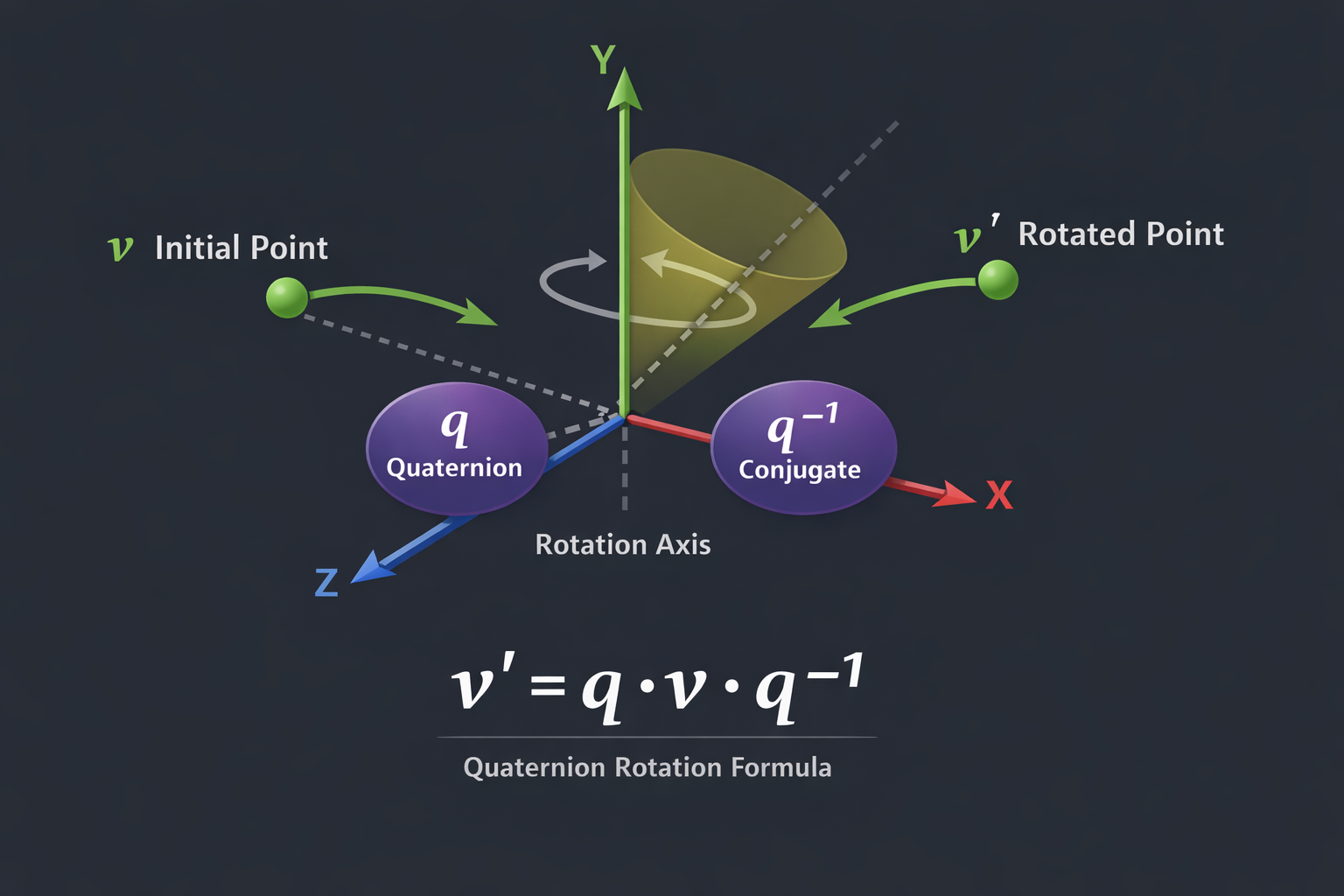
-<p>If you want, I can also <strong>draw a diagram showing the quaternion
-rotation concept</strong> visually — it really helps to understand how
-it rotates the cube around multiple axes at once.</p>
-<p>Do you want me to make that diagram?</p>
-<figure>
-<img
-src="https://nyquistdev.net/git/?p=basic-3d-example.git;a=blob_plain;f=docs/chatgpt-dump/quaternion-rotation.png;hb=HEAD"
-alt="diagram" />
-<figcaption aria-hidden="true">diagram</figcaption>
-</figure>
-<p>Great question — this is exactly the right point to slow down and
-understand the <strong>math</strong>, because quaternions feel “magical”
-until you see <em>why</em> each line exists.</p>
-<p>I’ll go step by step:</p>
-<hr />
-<h1 id="what-is-a-quaternion-in-graphics">1. What is a quaternion (in
-graphics)?</h1>
-<p>A <strong>quaternion</strong> is a 4-component number:</p>
-<p>[ q = (w, x, y, z)]</p>
-<p>In 3D graphics, we use <strong>unit quaternions</strong> to represent
-<strong>rotations</strong>.</p>
-<p>A rotation by:</p>
-<ul>
-<li>angle ( )</li>
-<li>around a <strong>unit axis</strong> ( = (u_x, u_y, u_z) )</li>
-</ul>
-<p>is encoded as:</p>
-<p>[ ]</p>
-<p>This is the <strong>axis–angle → quaternion</strong> formula.</p>
-<p>Why half-angle? Because quaternion rotation comes from complex
-numbers and Euler’s formula — doubling happens naturally in the
-math.</p>
-<hr />
-<h1 id="quatfromaxisangle">2. <code>quatFromAxisAngle</code></h1>
-<div class="sourceCode" id="cb25"><pre
-class="sourceCode js"><code class="sourceCode javascript"><span id="cb25-1"><a href="#cb25-1" aria-hidden="true" tabindex="-1"></a><span class="kw">function</span> <span class="fu">quatFromAxisAngle</span>(axis<span class="op">,</span> angle) {</span>
-<span id="cb25-2"><a href="#cb25-2" aria-hidden="true" tabindex="-1"></a> <span class="kw">const</span> h <span class="op">=</span> angle <span class="op">/</span> <span class="dv">2</span><span class="op">;</span></span>
-<span id="cb25-3"><a href="#cb25-3" aria-hidden="true" tabindex="-1"></a> <span class="kw">const</span> s <span class="op">=</span> <span class="bu">Math</span><span class="op">.</span><span class="fu">sin</span>(h)<span class="op">;</span></span>
-<span id="cb25-4"><a href="#cb25-4" aria-hidden="true" tabindex="-1"></a> <span class="cf">return</span> [<span class="bu">Math</span><span class="op">.</span><span class="fu">cos</span>(h)<span class="op">,</span> axis<span class="op">.</span><span class="at">x</span><span class="op">*</span>s<span class="op">,</span> axis<span class="op">.</span><span class="at">y</span><span class="op">*</span>s<span class="op">,</span> axis<span class="op">.</span><span class="at">z</span><span class="op">*</span>s]<span class="op">;</span></span>
-<span id="cb25-5"><a href="#cb25-5" aria-hidden="true" tabindex="-1"></a>}</span></code></pre></div>
-<h3 id="math-behind-it">Math behind it</h3>
-<p>You’re directly implementing:</p>
-<p>[ q = ((/2), (/2))]</p>
-<ul>
-<li><code>h = angle / 2</code> → half-angle</li>
-<li><code>cos(h)</code> → scalar part (w)</li>
-<li><code>axis * sin(h)</code> → vector part ((x,y,z))</li>
-</ul>
-<h3 id="important-rule">Important rule</h3>
-<p><code>axis</code> <strong>must be normalized</strong> (length = 1),
-otherwise rotation will scale or skew.</p>
-<hr />
-<h1 id="quaternion-multiplication-rotation-composition">3. Quaternion
-multiplication (rotation composition)</h1>
-<div class="sourceCode" id="cb26"><pre
-class="sourceCode js"><code class="sourceCode javascript"><span id="cb26-1"><a href="#cb26-1" aria-hidden="true" tabindex="-1"></a><span class="kw">function</span> <span class="fu">quatMultiply</span>(a<span class="op">,</span> b) {</span>
-<span id="cb26-2"><a href="#cb26-2" aria-hidden="true" tabindex="-1"></a> <span class="kw">const</span> [w1<span class="op">,</span>x1<span class="op">,</span>y1<span class="op">,</span>z1] <span class="op">=</span> a<span class="op">;</span></span>
-<span id="cb26-3"><a href="#cb26-3" aria-hidden="true" tabindex="-1"></a> <span class="kw">const</span> [w2<span class="op">,</span>x2<span class="op">,</span>y2<span class="op">,</span>z2] <span class="op">=</span> b<span class="op">;</span></span>
-<span id="cb26-4"><a href="#cb26-4" aria-hidden="true" tabindex="-1"></a> <span class="cf">return</span> [</span>
-<span id="cb26-5"><a href="#cb26-5" aria-hidden="true" tabindex="-1"></a> w1<span class="op">*</span>w2 <span class="op">-</span> x1<span class="op">*</span>x2 <span class="op">-</span> y1<span class="op">*</span>y2 <span class="op">-</span> z1<span class="op">*</span>z2<span class="op">,</span></span>
-<span id="cb26-6"><a href="#cb26-6" aria-hidden="true" tabindex="-1"></a> w1<span class="op">*</span>x2 <span class="op">+</span> x1<span class="op">*</span>w2 <span class="op">+</span> y1<span class="op">*</span>z2 <span class="op">-</span> z1<span class="op">*</span>y2<span class="op">,</span></span>
-<span id="cb26-7"><a href="#cb26-7" aria-hidden="true" tabindex="-1"></a> w1<span class="op">*</span>y2 <span class="op">-</span> x1<span class="op">*</span>z2 <span class="op">+</span> y1<span class="op">*</span>w2 <span class="op">+</span> z1<span class="op">*</span>x2<span class="op">,</span></span>
-<span id="cb26-8"><a href="#cb26-8" aria-hidden="true" tabindex="-1"></a> w1<span class="op">*</span>z2 <span class="op">+</span> x1<span class="op">*</span>y2 <span class="op">-</span> y1<span class="op">*</span>x2 <span class="op">+</span> z1<span class="op">*</span>w2</span>
-<span id="cb26-9"><a href="#cb26-9" aria-hidden="true" tabindex="-1"></a> ]<span class="op">;</span></span>
-<span id="cb26-10"><a href="#cb26-10" aria-hidden="true" tabindex="-1"></a>}</span></code></pre></div>
-<h3 id="math-formula">Math formula</h3>
-<p>Given: [ q_1 = (w_1, _1), q_2 = (w_2, _2)]</p>
-<p>Quaternion multiplication is:</p>
-<p>[ ]</p>
-<p>Expanded component-wise → exactly your code.</p>
-<h3 id="why-this-matters">Why this matters</h3>
-<ul>
-<li>Quaternion multiplication <strong>combines rotations</strong></li>
-<li>Order matters: [ q_{} = q_{} q_{}]</li>
-</ul>
-<p>This avoids <strong>gimbal lock</strong>, unlike Euler angles.</p>
-<hr />
-<h1 id="quaternion-conjugate">4. Quaternion conjugate</h1>
-<div class="sourceCode" id="cb27"><pre
-class="sourceCode js"><code class="sourceCode javascript"><span id="cb27-1"><a href="#cb27-1" aria-hidden="true" tabindex="-1"></a><span class="kw">function</span> <span class="fu">quatConjugate</span>(q) {</span>
-<span id="cb27-2"><a href="#cb27-2" aria-hidden="true" tabindex="-1"></a> <span class="cf">return</span> [q[<span class="dv">0</span>]<span class="op">,</span> <span class="op">-</span>q[<span class="dv">1</span>]<span class="op">,</span> <span class="op">-</span>q[<span class="dv">2</span>]<span class="op">,</span> <span class="op">-</span>q[<span class="dv">3</span>]]<span class="op">;</span></span>
-<span id="cb27-3"><a href="#cb27-3" aria-hidden="true" tabindex="-1"></a>}</span></code></pre></div>
-<h3 id="math-meaning">Math meaning</h3>
-<p>For: [ q = (w, x, y, z)]</p>
-<p>The conjugate is:</p>
-<p>[ ]</p>
-<h3 id="why-this-works">Why this works</h3>
-<p>If (q) is a <strong>unit quaternion</strong>:</p>
-<p>[ q^{-1} = q^*]</p>
-<p>So conjugate = <strong>inverse rotation</strong>.</p>
-<p>This is why cameras use conjugates — moving the world opposite to the
-camera rotation.</p>
-<hr />
-<h1 id="rotating-a-vector-using-quaternions">5. Rotating a vector using
-quaternions</h1>
-<div class="sourceCode" id="cb28"><pre
-class="sourceCode js"><code class="sourceCode javascript"><span id="cb28-1"><a href="#cb28-1" aria-hidden="true" tabindex="-1"></a><span class="kw">function</span> <span class="fu">quatRotateVector</span>(q<span class="op">,</span> v) {</span>
-<span id="cb28-2"><a href="#cb28-2" aria-hidden="true" tabindex="-1"></a> <span class="kw">const</span> qv <span class="op">=</span> [<span class="dv">0</span><span class="op">,</span> v<span class="op">.</span><span class="at">x</span><span class="op">,</span> v<span class="op">.</span><span class="at">y</span><span class="op">,</span> v<span class="op">.</span><span class="at">z</span>]<span class="op">;</span></span>
-<span id="cb28-3"><a href="#cb28-3" aria-hidden="true" tabindex="-1"></a> <span class="kw">const</span> r <span class="op">=</span> <span class="fu">quatMultiply</span>(<span class="fu">quatMultiply</span>(q<span class="op">,</span> qv)<span class="op">,</span> <span class="fu">quatConjugate</span>(q))<span class="op">;</span></span>
-<span id="cb28-4"><a href="#cb28-4" aria-hidden="true" tabindex="-1"></a> <span class="cf">return</span> { <span class="dt">x</span><span class="op">:</span> r[<span class="dv">1</span>]<span class="op">,</span> <span class="dt">y</span><span class="op">:</span> r[<span class="dv">2</span>]<span class="op">,</span> <span class="dt">z</span><span class="op">:</span> r[<span class="dv">3</span>] }<span class="op">;</span></span>
-<span id="cb28-5"><a href="#cb28-5" aria-hidden="true" tabindex="-1"></a>}</span></code></pre></div>
-<h3 id="the-key-formula">The key formula</h3>
-<p>To rotate a vector ( ):</p>
-<ol type="1">
-<li><p>Convert it to a <strong>pure quaternion</strong> [ v_q = (0, v_x,
-v_y, v_z)]</p></li>
-<li><p>Apply: [ ]</p></li>
-<li><p>Extract the vector part</p></li>
-</ol>
-<h3 id="why-this-works-1">Why this works</h3>
-<p>Quaternion rotation encodes:</p>
-<ul>
-<li>axis</li>
-<li>angle</li>
-<li>orientation</li>
-</ul>
-<p>The sandwich product rotates without:</p>
-<ul>
-<li>scaling</li>
-<li>skewing</li>
-<li>drifting</li>
-</ul>
-<hr />
-<h1 id="why-quaternions-are-better-than-matrices-for-rotation">6. Why
-quaternions are better than matrices (for rotation)</h1>
-<table>
-<thead>
-<tr class="header">
-<th>Problem</th>
-<th>Euler Angles</th>
-<th>Matrices</th>
-<th>Quaternions</th>
-</tr>
-</thead>
-<tbody>
-<tr class="odd">
-<td>Gimbal lock</td>
-<td>❌</td>
-<td>❌</td>
-<td>✅</td>
-</tr>
-<tr class="even">
-<td>Smooth interpolation</td>
-<td>❌</td>
-<td>⚠️</td>
-<td>✅ (SLERP)</td>
-</tr>
-<tr class="odd">
-<td>Compact</td>
-<td>✅</td>
-<td>❌</td>
-<td>✅</td>
-</tr>
-<tr class="even">
-<td>Numerical stability</td>
-<td>⚠️</td>
-<td>⚠️</td>
-<td>✅</td>
-</tr>
-</tbody>
-</table>
-<hr />
-<h1 id="visual-intuition">7. Visual intuition</h1>
-<p>A rotation quaternion represents:</p>
-<p>[ q = (/2) + (/2)(u_x i + u_y j + u_z k)]</p>
-<p>This is the 3D analog of:</p>
-<p>[ e^{i} = + i]</p>
-<hr />
-<h1 id="best-learning-resources-highly-recommended">8. Best learning
-resources (highly recommended)</h1>
-<h3 id="beginner-friendly">Beginner-friendly</h3>
-<ul>
-<li><p><strong>3Blue1Brown – Quaternions</strong></p>
-<ul>
-<li><a
-href="https://www.youtube.com/watch?v=zjMuIxRvygQ">https://www.youtube.com/watch?v=zjMuIxRvygQ</a></li>
-</ul></li>
-<li><p><strong>Visualizing Quaternions</strong></p>
-<ul>
-<li><a
-href="https://eater.net/quaternions">https://eater.net/quaternions</a></li>
-</ul></li>
-</ul>
-<h3 id="graphics-oriented">Graphics-oriented</h3>
-<ul>
-<li><p><strong>LearnOpenGL – Camera & Quaternions</strong></p>
-<ul>
-<li><a
-href="https://learnopengl.com/Getting-started/Camera">https://learnopengl.com/Getting-started/Camera</a></li>
-</ul></li>
-<li><p><strong>Scratchapixel – Quaternions</strong></p>
-<ul>
-<li><a
-href="https://www.scratchapixel.com/lessons/mathematics-physics-for-computer-graphics/quaternions">https://www.scratchapixel.com/lessons/mathematics-physics-for-computer-graphics/quaternions</a></li>
-</ul></li>
-</ul>
-<h3 id="math-reference">Math reference</h3>
-<ul>
-<li><p>Wikipedia (surprisingly solid)</p>
-<ul>
-<li><a
-href="https://en.wikipedia.org/wiki/Quaternion">https://en.wikipedia.org/wiki/Quaternion</a></li>
-<li><a
-href="https://en.wikipedia.org/wiki/Quaternions_and_spatial_rotation">https://en.wikipedia.org/wiki/Quaternions_and_spatial_rotation</a></li>
-</ul></li>
-</ul>
-<hr />
-<h1 id="mental-model-to-keep">9. Mental model to keep</h1>
-<blockquote>
-<p><strong>Quaternions don’t rotate vectors directly. They rotate
-<em>space itself</em> around the vector.</strong></p>
-</blockquote>
-<p>Once that clicks, camera math suddenly makes sense.</p>
-<hr />
-<p>If you want next:</p>
-<ul>
-<li>🔄 quaternion → rotation matrix</li>
-<li>🎥 why camera uses inverse rotation</li>
-<li>🎯 SLERP (smooth rotation interpolation)</li>
-<li>🧠 geometric intuition with diagrams</li>
-</ul>
-<p>Just tell me 👍</p>
</body>
</html>
-Absolutely! I can show you how to incorporate **quaternions** into your code to
-allow smooth rotation around **multiple axes at once**, avoiding the limitations
-of your current `rotate` function.
+Absolutely! I can show you how to incorporate **quaternions** into your code to allow smooth rotation around **multiple axes at once**, avoiding the limitations of your current `rotate` function.
Let’s go step by step.
Do you want me to do that?
-Absolutely! Let’s go through your **quaternion-based 3D cube code** line by line. I’ll break it down into sections so it’s easier to digest.
-
----
-
-## **1. Canvas Setup**
-
-```js
-const game = document.getElementById("game");
-game.width = 400;
-game.height = 400;
-```
-
-* Gets the `<canvas>` element with ID `game`.
-* Sets the canvas dimensions to 400×400 pixels.
-
-```js
-const BACKGROUND = "#101010";
-const FOREGROUND = "#50FF50";
-const TEXT = "#FFFFFF";
-```
-
-* Defines colors for background, cube lines, and text.
-
-```js
-const ctx = game.getContext("2d");
-```
-
-* Gets the 2D drawing context so we can draw shapes on the canvas.
-
----
-
-## **2. Cube Geometry**
-
-```js
-const vs = [ ... ];
-```
-
-* `vs` = **vertices** of a cube (8 points).
-* Each vertex has `x, y, z` coordinates in 3D space (values between -0.25 and 0.25).
-
-```js
-const fs = [ ... ];
-```
-
-* `fs` = **faces/edges** to connect vertices.
-* Some are quads `[0,1,2,3]`, some are edges `[0,4]`.
-* This tells the code **which points to draw lines between**.
-
-```js
-let dz = 1;
-let angle = 0;
-let activeAxes = ["x"];
-```
-
-* `dz`: distance to move the cube along Z (so it’s in front of the camera).
-* `angle`: current rotation angle.
-* `activeAxes`: which axes to rotate around (initially just `x`).
-
----
-
-## **3. Quaternion Functions**
-
-**a. Create a quaternion from an axis + angle**
-
-```js
-function quatFromAxisAngle(axis, angle) {
- const half = angle / 2;
- const s = Math.sin(half);
- return [
- Math.cos(half), // w
- axis.x * s, // x
- axis.y * s, // y
- axis.z * s // z
- ];
-}
-```
-
-* Converts **axis-angle rotation** into a quaternion `[w, x, y, z]`.
-* `half` = half the rotation angle.
-* `s = sin(half)` scales the axis.
-* `w` = cos(half).
-
-**b. Multiply two quaternions**
-
-```js
-function quatMultiply(q1, q2) { ... }
-```
-
-* Standard quaternion multiplication formula.
-* Combines two rotations into one. **Order matters!** `q1*q2` rotates q2 first, then q1.
-
-**c. Rotate a vector by a quaternion**
-
-```js
-function quatRotateVector(q, v) { ... }
-```
-
-* Rotates a 3D vector `v` using quaternion `q`.
-* Steps:
-
- 1. Convert vector to quaternion `qv = [0, vx, vy, vz]`.
- 2. Compute conjugate `qConj = [w, -x, -y, -z]`.
- 3. Rotate: `v' = q * qv * q⁻¹`.
- 4. Return new `x,y,z` of rotated vector.
-
----
-
-## **4. Drawing Functions**
-
-**Clear canvas and draw text**
-
-```js
-function clear() {
- ctx.fillStyle = BACKGROUND;
- ctx.fillRect(0, 0, game.width, game.height);
- ctx.fillStyle = TEXT;
- ctx.font = "20px serif";
- ctx.fillText(" *click me to change rotation axes", 10, game.height - 15);
- ctx.fillText("current axes: " + activeAxes.join(","), 10, 20);
-}
-```
-
-* Clears the canvas with the background color.
-* Draws instructions and current axes at the top/bottom.
-
-**Draw a point**
-
-```js
-function point({x, y}) {
- const s = 20;
- ctx.fillStyle = FOREGROUND;
- ctx.fillRect(x - s/2, y - s/2, s, s);
-}
-```
-
-* Draws a small square at `(x, y)` on the screen.
-* Not used in the final version, but useful for debugging vertices.
-
-**Draw a line**
-
-```js
-function line(p1, p2) { ... }
-```
-
-* Draws a thick line from `p1` to `p2` in canvas coordinates.
-
-**Convert 3D to screen coordinates**
-
-```js
-function screen(p) {
- return {
- x: (p.x + 1)/2 * game.width,
- y: (1 -(p.y + 1)/2) * game.height
- };
-}
-```
-
-* Maps normalized coordinates `[-1,1]` to screen coordinates `[0, width/height]`.
-* Y-axis is flipped because canvas y=0 is top.
-
-**Project 3D to 2D**
-
-```js
-function project({x, y, z}) {
- return { x: x/z, y: y/z };
-}
-```
-
-* Simple **perspective projection**: divides x and y by z (makes things farther away appear smaller).
-
-**Translate along Z**
-
-```js
-function translateZ({x,y,z}, dz) {
- return {x, y, z: z + dz};
-}
-```
-
-* Moves the cube forward/backward so it appears in front of the camera.
-
----
-
-## **5. Animation Loop**
-
-```js
-const FPS = 60;
-
-function frame() {
- const dt = 1/FPS;
- angle += Math.PI*dt;
-```
-
-* Updates rotation angle every frame based on FPS.
-
-**Create combined quaternion**
-
-```js
- let q = [1,0,0,0]; // identity quaternion
- activeAxes.forEach(axis => {
- let qAxis;
- if (axis === "x") qAxis = quatFromAxisAngle({x:1,y:0,z:0}, angle);
- if (axis === "y") qAxis = quatFromAxisAngle({x:0,y:1,z:0}, angle);
- if (axis === "z") qAxis = quatFromAxisAngle({x:0,y:0,z:1}, angle);
- q = quatMultiply(qAxis, q); // multiply in order
- });
-```
-
-* Starts with **identity quaternion** (no rotation).
-* For each active axis, creates a quaternion for rotation around that axis.
-* Combines them by multiplying — this lets the cube rotate around multiple axes **simultaneously**.
-
-**Draw the cube**
-
-```js
- clear();
- for (const f of fs) {
- for (let i = 0; i < f.length; ++i) {
- const a = vs[f[i]];
- const b = vs[f[(i + 1)%f.length]];
- line(
- screen(project(translateZ(quatRotateVector(q, a), dz))),
- screen(project(translateZ(quatRotateVector(q, b), dz)))
- );
- }
- }
-```
-
-* Clears the canvas.
-* Loops through each face/edge `f`.
-* Rotates each vertex using the combined quaternion.
-* Translates it forward along Z.
-* Projects 3D coordinates into 2D screen coordinates.
-* Draws lines connecting vertices.
-
-**Schedule next frame**
-
-```js
- setTimeout(frame, 1000/FPS);
-}
-setTimeout(frame, 1000/FPS);
-```
-
-* Calls `frame()` every 1/60th of a second to animate.
-
----
-
-## **6. Handle Clicks**
-
-```js
-game.onclick = () => {
- const allAxes = [["x"], ["y"], ["z"], ["x","y"], ["y","z"], ["x","z"], ["x","y","z"]];
- const index = allAxes.findIndex(a => JSON.stringify(a) === JSON.stringify(activeAxes));
- activeAxes = allAxes[(index + 1) % allAxes.length];
-};
-```
-
-* On click, cycles through different **axis combinations**: x, y, z, xy, yz, xz, xyz.
-* Updates `activeAxes` so the cube rotates differently next frame.
-
----
-
-### ✅ **Summary**
-
-* **Vertices + Faces**: Define cube geometry.
-* **Quaternions**: Handle rotation around multiple axes safely.
-* **Project & Screen Functions**: Convert 3D points to 2D canvas.
-* **Animation Loop**: Updates rotation, applies quaternion rotation, and draws cube.
-* **Click Handler**: Change which axes to rotate around.
-
----
-
-If you want, I can also **draw a diagram showing the quaternion rotation concept** visually — it really helps to understand how it rotates the cube around multiple axes at once.
-
-Do you want me to make that diagram?
-
-
-
-Great question — this is exactly the right point to slow down and understand the **math**, because quaternions feel “magical” until you see *why* each line exists.
-
-I’ll go step by step:
-
----
-
-# 1. What is a quaternion (in graphics)?
-
-A **quaternion** is a 4-component number:
-
-[
-q = (w, x, y, z)
-]
-
-In 3D graphics, we use **unit quaternions** to represent **rotations**.
-
-A rotation by:
-
-* angle ( \theta )
-* around a **unit axis** ( \vec{u} = (u_x, u_y, u_z) )
-
-is encoded as:
-
-[
-\boxed{
-q = \left(
-\cos\frac{\theta}{2},
-; u_x \sin\frac{\theta}{2},
-; u_y \sin\frac{\theta}{2},
-; u_z \sin\frac{\theta}{2}
-\right)
-}
-]
-
-This is the **axis–angle → quaternion** formula.
-
-Why half-angle?
-Because quaternion rotation comes from complex numbers and Euler’s formula — doubling happens naturally in the math.
-
----
-
-# 2. `quatFromAxisAngle`
-
-```js
-function quatFromAxisAngle(axis, angle) {
- const h = angle / 2;
- const s = Math.sin(h);
- return [Math.cos(h), axis.x*s, axis.y*s, axis.z*s];
-}
-```
-
-### Math behind it
-
-You’re directly implementing:
-
-[
-q = (\cos(\theta/2), \vec{u}\sin(\theta/2))
-]
-
-* `h = angle / 2` → half-angle
-* `cos(h)` → scalar part (w)
-* `axis * sin(h)` → vector part ((x,y,z))
-
-### Important rule
-
-`axis` **must be normalized** (length = 1), otherwise rotation will scale or skew.
-
----
-
-# 3. Quaternion multiplication (rotation composition)
-
-```js
-function quatMultiply(a, b) {
- const [w1,x1,y1,z1] = a;
- const [w2,x2,y2,z2] = b;
- return [
- w1*w2 - x1*x2 - y1*y2 - z1*z2,
- w1*x2 + x1*w2 + y1*z2 - z1*y2,
- w1*y2 - x1*z2 + y1*w2 + z1*x2,
- w1*z2 + x1*y2 - y1*x2 + z1*w2
- ];
-}
-```
-
-### Math formula
-
-Given:
-[
-q_1 = (w_1, \vec{v}_1), \quad q_2 = (w_2, \vec{v}_2)
-]
-
-Quaternion multiplication is:
-
-[
-\boxed{
-q_1 q_2 =
-\left(
-w_1 w_2 - \vec{v}_1 \cdot \vec{v}_2,;
-w_1 \vec{v}_2 + w_2 \vec{v}_1 + \vec{v}_1 \times \vec{v}_2
-\right)
-}
-]
-
-Expanded component-wise → exactly your code.
-
-### Why this matters
-
-* Quaternion multiplication **combines rotations**
-* Order matters:
- [
- q_{\text{final}} = q_{\text{new}} \cdot q_{\text{current}}
- ]
-
-This avoids **gimbal lock**, unlike Euler angles.
-
----
-
-# 4. Quaternion conjugate
-
-```js
-function quatConjugate(q) {
- return [q[0], -q[1], -q[2], -q[3]];
-}
-```
-
-### Math meaning
-
-For:
-[
-q = (w, x, y, z)
-]
-
-The conjugate is:
-
-[
-\boxed{
-q^* = (w, -x, -y, -z)
-}
-]
-
-### Why this works
-
-If (q) is a **unit quaternion**:
-
-[
-q^{-1} = q^*
-]
-
-So conjugate = **inverse rotation**.
-
-This is why cameras use conjugates — moving the world opposite to the camera rotation.
-
----
-
-# 5. Rotating a vector using quaternions
-
-```js
-function quatRotateVector(q, v) {
- const qv = [0, v.x, v.y, v.z];
- const r = quatMultiply(quatMultiply(q, qv), quatConjugate(q));
- return { x: r[1], y: r[2], z: r[3] };
-}
-```
-
-### The key formula
-
-To rotate a vector ( \vec{v} ):
-
-1. Convert it to a **pure quaternion**
- [
- v_q = (0, v_x, v_y, v_z)
- ]
-
-2. Apply:
- [
- \boxed{
- v' = q ; v_q ; q^{-1}
- }
- ]
-
-3. Extract the vector part
-
-### Why this works
-
-Quaternion rotation encodes:
-
-* axis
-* angle
-* orientation
-
-The sandwich product rotates without:
-
-* scaling
-* skewing
-* drifting
-
----
-
-# 6. Why quaternions are better than matrices (for rotation)
-
-| Problem | Euler Angles | Matrices | Quaternions |
-| -------------------- | ------------ | -------- | ----------- |
-| Gimbal lock | ❌ | ❌ | ✅ |
-| Smooth interpolation | ❌ | ⚠️ | ✅ (SLERP) |
-| Compact | ✅ | ❌ | ✅ |
-| Numerical stability | ⚠️ | ⚠️ | ✅ |
-
----
-
-# 7. Visual intuition
-
-A rotation quaternion represents:
-
-[
-q = \cos(\theta/2) + \sin(\theta/2)(u_x i + u_y j + u_z k)
-]
-
-This is the 3D analog of:
-
-[
-e^{i\theta} = \cos\theta + i\sin\theta
-]
-
----
-
-# 8. Best learning resources (highly recommended)
-
-### Beginner-friendly
-
-* **3Blue1Brown – Quaternions**
-
- * [https://www.youtube.com/watch?v=zjMuIxRvygQ](https://www.youtube.com/watch?v=zjMuIxRvygQ)
-* **Visualizing Quaternions**
-
- * [https://eater.net/quaternions](https://eater.net/quaternions)
-
-### Graphics-oriented
-
-* **LearnOpenGL – Camera & Quaternions**
-
- * [https://learnopengl.com/Getting-started/Camera](https://learnopengl.com/Getting-started/Camera)
-* **Scratchapixel – Quaternions**
-
- * [https://www.scratchapixel.com/lessons/mathematics-physics-for-computer-graphics/quaternions](https://www.scratchapixel.com/lessons/mathematics-physics-for-computer-graphics/quaternions)
-
-### Math reference
-
-* Wikipedia (surprisingly solid)
-
- * [https://en.wikipedia.org/wiki/Quaternion](https://en.wikipedia.org/wiki/Quaternion)
- * [https://en.wikipedia.org/wiki/Quaternions_and_spatial_rotation](https://en.wikipedia.org/wiki/Quaternions_and_spatial_rotation)
-
----
-
-# 9. Mental model to keep
-
-> **Quaternions don’t rotate vectors directly.
-> They rotate *space itself* around the vector.**
-
-Once that clicks, camera math suddenly makes sense.
-
----
-
-If you want next:
-
-* 🔄 quaternion → rotation matrix
-* 🎥 why camera uses inverse rotation
-* 🎯 SLERP (smooth rotation interpolation)
-* 🧠 geometric intuition with diagrams
-
-Just tell me 👍
-
-Absolutely — let’s unpack those sentences slowly and connect the symbols to intuition.
-
----
-
-## 1. “A quaternion is an expression of the form”
-
-[
-a + b,\mathbf{i} + c,\mathbf{j} + d,\mathbf{k}
-]
-
-This means that **every quaternion can be written as a sum of four parts**:
-
-* one **real (scalar)** part
-* three **imaginary (vector-like)** parts
-
-So a quaternion has **four real numbers** in it, not just two like a complex number.
-
----
-
-## 2. The coefficients (a, b, c, d)
-
-> “where (a, b, c, d) are real numbers”
-
-* These are just ordinary real numbers (like (2), (-1.3), (\pi), etc.).
-* They tell you **how much** of each basis element the quaternion contains.
-
-Think of them as coordinates.
-
----
-
-## 3. The symbols (\mathbf{i}, \mathbf{j}, \mathbf{k})
-
-> “and (\mathbf{i}, \mathbf{j}, \mathbf{k}) are symbols that can be interpreted as unit-vectors pointing along the three spatial axes.”
-
-These symbols are **not numbers** in the usual sense. They are **basis elements** that behave in special ways.
-
-### Interpretation:
-
-* (\mathbf{i}) → x-axis direction
-* (\mathbf{j}) → y-axis direction
-* (\mathbf{k}) → z-axis direction
-
-So:
-[
-b,\mathbf{i} + c,\mathbf{j} + d,\mathbf{k}
-]
-looks exactly like a 3D vector:
-[
-(b, c, d)
-]
-
----
-
-## 4. Scalar part vs vector part
-
-The quaternion naturally splits into two pieces:
-
-[
-\underbrace{a}*{\text{scalar part}}
-\quad + \quad
-\underbrace{(b,\mathbf{i} + c,\mathbf{j} + d,\mathbf{k})}*{\text{vector part}}
-]
-
-This matches the earlier notation:
-[
-\mathbf{q} = (r, \vec{v})
-]
-where:
-
-* (r = a)
-* (\vec{v} = (b, c, d))
-
----
-
-## 5. How this extends complex numbers
-
-Complex numbers look like:
-[
-a + b,\mathbf{i}
-]
-
-Quaternions **extend** this idea:
-
-* one real axis
-* three imaginary axes
-
-So instead of a 2D number system, quaternions live in **4D**.
-
----
-
-## 6. Important difference from vectors
-
-Although (\mathbf{i}, \mathbf{j}, \mathbf{k}) *look* like unit vectors, they are actually **algebraic objects with multiplication rules**:
-
-[
-\mathbf{i}^2 = \mathbf{j}^2 = \mathbf{k}^2 = \mathbf{i}\mathbf{j}\mathbf{k} = -1
-]
-
-and multiplication is **not commutative**:
-[
-\mathbf{i}\mathbf{j} = \mathbf{k}, \quad
-\mathbf{j}\mathbf{i} = -\mathbf{k}
-]
-
-This is why quaternions are so powerful for rotations.
-
----
-
-## 7. Geometric intuition
-
-You can think of a quaternion as:
-
-* a **real number** (a), plus
-* a **3D direction and magnitude** ((b, c, d))
-
-When used for rotations:
-
-* (a) relates to the rotation angle
-* ((b, c, d)) relates to the rotation axis
-
----
-
-## 8. Plain-English summary
-
-> A quaternion is built from one real number and three imaginary components. The imaginary parts behave like directions in 3D space and follow special multiplication rules. Together, they form a 4-dimensional number system that can represent 3D rotations cleanly and efficiently.
-
-If you’d like, I can next:
-
-* show how quaternion multiplication works geometrically
-* explain why quaternions avoid gimbal lock
-* relate quaternions directly to rotation matrices
-
-Great question — this is where quaternions really become *geometric*, not just algebraic.
-
-I’ll build this up step by step, from intuition to the final geometric meaning.
-
----
-
-## 1. Unit quaternions represent rotations
-
-A **unit quaternion** (length = 1) represents a 3D rotation.
-
-It is written as:
-[
-q = \cos\frac{\theta}{2} + \hat{u},\sin\frac{\theta}{2}
-]
-where:
-
-* (\theta) = rotation angle
-* (\hat{u} = u_x\mathbf{i} + u_y\mathbf{j} + u_z\mathbf{k}) is a **unit vector** (rotation axis)
-
-This already encodes geometry:
-
-* **axis** → direction of the vector part
-* **angle** → stored in the sine/cosine terms
-
----
-
-## 2. Rotating a vector using a quaternion
-
-A 3D vector (\vec{v}) is treated as a **pure quaternion**:
-[
-\vec{v} ;\longrightarrow; 0 + v_x\mathbf{i} + v_y\mathbf{j} + v_z\mathbf{k}
-]
-
-The rotated vector is:
-[
-\vec{v},' = q,\vec{v},q^{-1}
-]
-
-This is not arbitrary — this *is* the geometric action of rotation.
-
----
-
-## 3. What quaternion multiplication does geometrically
-
-### Key idea:
-
-> **Quaternion multiplication composes rotations.**
-
-If:
-
-* (q_1) rotates by (\theta_1) around axis (\hat{u}_1)
-* (q_2) rotates by (\theta_2) around axis (\hat{u}_2)
-
-Then:
-[
-q = q_2 q_1
-]
-represents:
-
-> “First rotate by (q_1), then rotate by (q_2)”
-
-This is exactly how matrix multiplication works for rotations.
-
----
-
-## 4. Why order matters (non-commutativity)
-
-Quaternion multiplication is **not commutative**:
-[
-q_1 q_2 \neq q_2 q_1
-]
-
-Geometrically:
-
-* Rotating around **x then y** is not the same as **y then x**
-
-This matches real-world 3D rotations.
-
----
-
-## 5. Vector–scalar decomposition of multiplication
-
-Let:
-[
-q_1 = (r_1, \vec{v}_1), \quad
-q_2 = (r_2, \vec{v}_2)
-]
-
-Their product is:
-[
-q_2 q_1 =
-\big(
-r_2 r_1 - \vec{v}_2 \cdot \vec{v}_1,;
-r_2 \vec{v}_1 + r_1 \vec{v}_2 + \vec{v}_2 \times \vec{v}_1
-\big)
-]
-
-### Geometric meaning of each term:
-
-* **Dot product** → angle alignment
-* **Cross product** → axis perpendicular to both rotations
-* **Linear terms** → mixing scalar and vector parts
-
-So quaternion multiplication naturally combines:
-
-* angle information (dot)
-* axis orientation (cross)
-
----
-
-## 6. Visual intuition
-
-Think of a unit quaternion as:
-
-* a point on a **4D unit sphere**
-* encoding a rotation in 3D space
-
-Multiplying two unit quaternions:
-
-* moves you along that sphere
-* in a way that corresponds exactly to doing one rotation after another
-
----
-
-## 7. Why the half-angle appears
-
-You might wonder:
-
-> Why (\theta/2), not (\theta)?
-
-Geometrically:
-
-* Rotations form a curved space (SO(3))
-* Unit quaternions live in a simpler space (SU(2)) that *double-covers* rotations
-* The half-angle makes multiplication correspond cleanly to rotation composition
-
-That’s why:
-[
-q \text{ and } -q
-]
-represent the **same rotation**.
-
----
-
-## 8. Simple concrete example
-
-Rotate 90° about the z-axis:
-[
-q = \cos 45^\circ + \mathbf{k}\sin 45^\circ
-]
-
-Apply it to (\mathbf{i}) (the x-axis):
-[
-\mathbf{i}' = q,\mathbf{i},q^{-1} = \mathbf{j}
-]
-
-Geometrically:
-
-* x-axis rotates into y-axis
-* exactly what you expect
-
----
-
-## 9. Plain-English summary
-
-> Quaternion multiplication is not “multiplying numbers.”
-> It is **combining rotations in 3D space**.
-> The algebra mirrors the geometry: dot products handle angles, cross products handle axes, and order encodes rotation order.
-
-If you want, next I can:
-
-* derive the rotation formula step-by-step
-* show the link to rotation matrices
-* explain the double-cover and why (q) and (-q) are the same rotation
-
</div>
-<script src="https://nyquistdev.net/git/?p=basic-3d-example.git;a=blob_plain;f=index.js;hb=HEAD"></script>
+<script src="https://nyquistdev.net/git/?p=basic-3d-example.git;a=blob_plain;f=index.js;hb=refs/heads/simple-rotation"></script>
<script>
-fetch('https://nyquistdev.net/git/?p=basic-3d-example.git;a=blob_plain;f=index.js;hb=HEAD')
+fetch('https://nyquistdev.net/git/?p=basic-3d-example.git;a=blob_plain;f=index.js;hb=refs/heads/simple-rotation')
.then(res => res.text())
.then(code => {
const codeEl = document.querySelector('#code-viewer code');
-const canvas = document.getElementById("game");
-canvas.width = 800;
-canvas.height = 800;
-const ctx = canvas.getContext("2d");
-
-let objects = {
- cube: {
- vertices: [
- // front
- {x: -0.5 , y: -0.5, z: 0.5}, // top left
- {x: 0.5 , y: -0.5, z: 0.5}, // top right
- {x: 0.5 , y: 0.5, z: 0.5}, // bottom right
- {x: -0.5 , y: 0.5, z: 0.5}, // bottom left
-
- // back
- {x: -0.5 , y: -0.5, z: -0.5}, // top left
- {x: 0.5 , y: -0.5, z: -0.5}, // top right
- {x: 0.5 , y: 0.5, z: -0.5}, // bottom right
- {x: -0.5 , y: 0.5, z: -0.5}, // bottom left
- ],
- index_buffers: [
- [0, 1, 2, 3],
- [4, 5, 6, 7],
- [0, 4],
- [1, 5],
- [2, 6],
- [3, 7],
- ]
+
+game.width = 800
+game.height = 800
+
+const BACKGROUND = "#101010"
+const FOREGROUND = "#50FF50"
+const TEXT = "#FFFFFF"
+let rotationAxis = "yz"
+const ctx = game.getContext("2d")
+let axis = null
+
+function clear() {
+ ctx.fillStyle = BACKGROUND
+ ctx.fillRect(0, 0, game.width, game.height)
+ ctx.fillStyle = TEXT
+ ctx.font = "20px serif"
+ ctx.fillText(" *click me to change my rotation axis", 10, game.height - 15)
+ switch (rotationAxis) {
+ case "yz": axis = "x-axis"; break;
+ case "xz": axis = "y-axis"; break;
+ case "xy": axis = "z-axis"; break;
}
+ ctx.fillText("current rotation axis: " + axis, 10, 15)
}
-function project({x, y, z}) {
- return {
- x: x/z,
- y: y/z
- }
+function point({x, y}) {
+ const s = 20
+ ctx.fillStyle = FOREGROUND
+ ctx.fillRect(x - s/2, y - s/2, s, s)
}
-function screen({x, y}) {
+function line(p1, p2) {
+ ctx.lineWidth = 3
+ ctx.strokeStyle = FOREGROUND
+ ctx.beginPath();
+ ctx.moveTo(p1.x, p1.y)
+ ctx.lineTo(p2.x, p2.y)
+ ctx.stroke()
+}
+
+function screen(p) {
//-1..1 -> 0..2 -> 0..1 -> 0..w/h
// p.y *= -1
return {
- x: (x + 1)/2 * canvas.width,
- y: (1 -(y + 1)/2) * canvas.height
+ x: (p.x + 1)/2 * game.width,
+ y: (1 -(p.y + 1)/2) * game.height
}
}
-function clear() {
- ctx.fillStyle = "#000000"
- ctx.fillRect(0, 0, canvas.width, canvas.height);
+function project({x, y, z}) {
+ return {
+ x: x/z,
+ y: y/z,
+ }
}
-function translateZ({x, y, z}, dz) {
- return {x: x, y: y, z: z + dz};
+
+function translateZ({x,y,z}, dz) {
+ return {x, y, z: z + dz}
}
-function line(p1, p2) {
- ctx.lineWidth = 3;
- ctx.strokeStyle = "#FF0000";
- ctx.beginPath();
- ctx.moveTo(p1.x, p1.y);
- ctx.lineTo(p2.x, p2.y);
- ctx.stroke();
+function rotate({x, y, z}, axis, angle) {
+ // rotating a vector
+ const c = Math.cos(angle)
+ const s = Math.sin(angle)
+ switch (axis) {
+ case "yz": return {x, y:y*c-z*s, z: y*s+z*c} // x-axis
+ case "xz": return {x: x*c-z*s, y, z: x*s+z*c} // y-axis
+ case "xy": return {x: x*c-y*s, y: x*s+y*c, z} // z-axis
+ }
}
+const vs = [
+ {x: 0.25, y: 0.25, z: 0.25},
+ {x: -0.25, y: 0.25, z: 0.25},
+ {x: -0.25, y: -0.25, z: 0.25},
+ {x: 0.25, y: -0.25, z: 0.25},
+
+ {x: 0.25, y: 0.25, z: -0.25},
+ {x: -0.25, y: 0.25, z: -0.25},
+ {x: -0.25, y: -0.25, z: -0.25},
+ {x: 0.25, y: -0.25, z: -0.25},
+]
+
+const fs = [
+ [0, 1, 2, 3],
+ [4, 5, 6, 7],
+ [0, 4],
+ [1, 5],
+ [2, 6],
+ [3, 7],
+]
+
+let dz = 1
+let angle = 0
+const FPS = 60
function frame() {
- clear();
- let dz = 1.5
-
- let index_buffers = objects.cube.index_buffers;
- let vertices = objects.cube.vertices;
-
- for (const face of index_buffers) {
- for (let j = 0; j < face.length; j++) {
- let idA = face[j];
- let idB = face[(j + 1) % face.length];
-
- const a = vertices[idA];
- const b = vertices[idB];
-
- let ta = screen(project(translateZ(a, dz)));
- let tb = screen(project(translateZ(b, dz)));
-
- line(ta, tb);
+ const dt = 1/FPS
+ angle += Math.PI*dt
+ clear()
+ for (const f of fs) {
+ for (let i = 0; i < f.length; ++i) {
+ const a = vs[f[i]]
+ const b = vs[f[(i + 1)%f.length]]
+
+ line(
+ screen(project(translateZ(rotate(a, rotationAxis, angle), dz))),
+ screen(project(translateZ(rotate(b, rotationAxis, angle), dz)))
+ )
}
+
}
+ setTimeout(frame, 1000/FPS)
}
frame()
+
+let i = 0
+game.onclick = () => {
+ let rotations = ["yz", "xz", "xy"]
+ i += 1
+ rotationAxis = rotations[i%rotations.length]
+};
@media amzn-kf8{#header,#content,#footnotes,#footer{padding:0}}
</style>
<link rel="stylesheet" href="https://cdnjs.cloudflare.com/ajax/libs/font-awesome/4.7.0/css/font-awesome.min.css">
-<style>
-pre.pygments .hll { background-color: #49483e }
-pre.pygments { background: #272822; color: #F8F8F2 }
-pre.pygments .tok-c { color: #959077 } /* Comment */
-pre.pygments .tok-err { color: #ED007E; background-color: #1E0010 } /* Error */
-pre.pygments .tok-esc { color: #F8F8F2 } /* Escape */
-pre.pygments .tok-g { color: #F8F8F2 } /* Generic */
-pre.pygments .tok-k { color: #66D9EF } /* Keyword */
-pre.pygments .tok-l { color: #AE81FF } /* Literal */
-pre.pygments .tok-n { color: #F8F8F2 } /* Name */
-pre.pygments .tok-o { color: #FF4689 } /* Operator */
-pre.pygments .tok-x { color: #F8F8F2 } /* Other */
-pre.pygments .tok-p { color: #F8F8F2 } /* Punctuation */
-pre.pygments .tok-ch { color: #959077 } /* Comment.Hashbang */
-pre.pygments .tok-cm { color: #959077 } /* Comment.Multiline */
-pre.pygments .tok-cp { color: #959077 } /* Comment.Preproc */
-pre.pygments .tok-cpf { color: #959077 } /* Comment.PreprocFile */
-pre.pygments .tok-c1 { color: #959077 } /* Comment.Single */
-pre.pygments .tok-cs { color: #959077 } /* Comment.Special */
-pre.pygments .tok-gd { color: #FF4689 } /* Generic.Deleted */
-pre.pygments .tok-ge { color: #F8F8F2; font-style: italic } /* Generic.Emph */
-pre.pygments .tok-ges { color: #F8F8F2; font-weight: bold; font-style: italic } /* Generic.EmphStrong */
-pre.pygments .tok-gr { color: #F8F8F2 } /* Generic.Error */
-pre.pygments .tok-gh { color: #F8F8F2 } /* Generic.Heading */
-pre.pygments .tok-gi { color: #A6E22E } /* Generic.Inserted */
-pre.pygments .tok-go { color: #66D9EF } /* Generic.Output */
-pre.pygments .tok-gp { color: #FF4689; font-weight: bold } /* Generic.Prompt */
-pre.pygments .tok-gs { color: #F8F8F2; font-weight: bold } /* Generic.Strong */
-pre.pygments .tok-gu { color: #959077 } /* Generic.Subheading */
-pre.pygments .tok-gt { color: #F8F8F2 } /* Generic.Traceback */
-pre.pygments .tok-kc { color: #66D9EF } /* Keyword.Constant */
-pre.pygments .tok-kd { color: #66D9EF } /* Keyword.Declaration */
-pre.pygments .tok-kn { color: #FF4689 } /* Keyword.Namespace */
-pre.pygments .tok-kp { color: #66D9EF } /* Keyword.Pseudo */
-pre.pygments .tok-kr { color: #66D9EF } /* Keyword.Reserved */
-pre.pygments .tok-kt { color: #66D9EF } /* Keyword.Type */
-pre.pygments .tok-ld { color: #E6DB74 } /* Literal.Date */
-pre.pygments .tok-m { color: #AE81FF } /* Literal.Number */
-pre.pygments .tok-s { color: #E6DB74 } /* Literal.String */
-pre.pygments .tok-na { color: #A6E22E } /* Name.Attribute */
-pre.pygments .tok-nb { color: #F8F8F2 } /* Name.Builtin */
-pre.pygments .tok-nc { color: #A6E22E } /* Name.Class */
-pre.pygments .tok-no { color: #66D9EF } /* Name.Constant */
-pre.pygments .tok-nd { color: #A6E22E } /* Name.Decorator */
-pre.pygments .tok-ni { color: #F8F8F2 } /* Name.Entity */
-pre.pygments .tok-ne { color: #A6E22E } /* Name.Exception */
-pre.pygments .tok-nf { color: #A6E22E } /* Name.Function */
-pre.pygments .tok-nl { color: #F8F8F2 } /* Name.Label */
-pre.pygments .tok-nn { color: #F8F8F2 } /* Name.Namespace */
-pre.pygments .tok-nx { color: #A6E22E } /* Name.Other */
-pre.pygments .tok-py { color: #F8F8F2 } /* Name.Property */
-pre.pygments .tok-nt { color: #FF4689 } /* Name.Tag */
-pre.pygments .tok-nv { color: #F8F8F2 } /* Name.Variable */
-pre.pygments .tok-ow { color: #FF4689 } /* Operator.Word */
-pre.pygments .tok-pm { color: #F8F8F2 } /* Punctuation.Marker */
-pre.pygments .tok-w { color: #F8F8F2 } /* Text.Whitespace */
-pre.pygments .tok-mb { color: #AE81FF } /* Literal.Number.Bin */
-pre.pygments .tok-mf { color: #AE81FF } /* Literal.Number.Float */
-pre.pygments .tok-mh { color: #AE81FF } /* Literal.Number.Hex */
-pre.pygments .tok-mi { color: #AE81FF } /* Literal.Number.Integer */
-pre.pygments .tok-mo { color: #AE81FF } /* Literal.Number.Oct */
-pre.pygments .tok-sa { color: #E6DB74 } /* Literal.String.Affix */
-pre.pygments .tok-sb { color: #E6DB74 } /* Literal.String.Backtick */
-pre.pygments .tok-sc { color: #E6DB74 } /* Literal.String.Char */
-pre.pygments .tok-dl { color: #E6DB74 } /* Literal.String.Delimiter */
-pre.pygments .tok-sd { color: #E6DB74 } /* Literal.String.Doc */
-pre.pygments .tok-s2 { color: #E6DB74 } /* Literal.String.Double */
-pre.pygments .tok-se { color: #AE81FF } /* Literal.String.Escape */
-pre.pygments .tok-sh { color: #E6DB74 } /* Literal.String.Heredoc */
-pre.pygments .tok-si { color: #E6DB74 } /* Literal.String.Interpol */
-pre.pygments .tok-sx { color: #E6DB74 } /* Literal.String.Other */
-pre.pygments .tok-sr { color: #E6DB74 } /* Literal.String.Regex */
-pre.pygments .tok-s1 { color: #E6DB74 } /* Literal.String.Single */
-pre.pygments .tok-ss { color: #E6DB74 } /* Literal.String.Symbol */
-pre.pygments .tok-bp { color: #F8F8F2 } /* Name.Builtin.Pseudo */
-pre.pygments .tok-fm { color: #A6E22E } /* Name.Function.Magic */
-pre.pygments .tok-vc { color: #F8F8F2 } /* Name.Variable.Class */
-pre.pygments .tok-vg { color: #F8F8F2 } /* Name.Variable.Global */
-pre.pygments .tok-vi { color: #F8F8F2 } /* Name.Variable.Instance */
-pre.pygments .tok-vm { color: #F8F8F2 } /* Name.Variable.Magic */
-pre.pygments .tok-il { color: #AE81FF } /* Literal.Number.Integer.Long */
-</style>
<head>
<!-- <link rel="stylesheet" href="https://fonts.googleapis.com/css?family=DotGothic16"> -->
<!-- <link rel="icon" type="image/x-icon" href="https://raw.githubusercontent.com/A-Larsen/math-notes/refs/heads/main/favicon.png"> -->
window.addEventListener("load", sendHeight);
window.addEventListener("resize", sendHeight);
</script>
+
+
</head>
<body class="article">
<div id="header">
<div id="content">
<div id="preamble">
<div class="sectionbody">
+<style>
+#game {
+ display: block;
+ margin: 0 auto;
+}
+</style>
+
+<canvas id="game"></canvas>
+<script src="https://nyquistdev.net/git/?p=basic-3d-example.git;a=blob_plain;f=index.js;hb=HEAD"></script>
<div class="paragraph">
-<p>click <a href="https://nyquistdev.net/git/?p=basic-3d-example.git;a=blob_plain;f=example.html;hb=HEAD"">here</a> for an interactive example</p>
-</div>
-<div class="paragraph">
-<p>A good explaination of how 3D works.</p>
+<p>A good explaination how 3D works. If you click the cube you can change the axis
+it will rotate on.</p>
</div>
<div class="admonitionblock note">
<table>
<i class="fa icon-note" title="Note"></i>
</td>
<td class="content">
-This started off as code from Tsoding, I used chatgpt to change
- specific things, and also made some of my own changes. This is a learning
- tool! not something I wrote off the top of my head
+This started off as code from Tsoding
</td>
</tr>
</table>
</div>
</div>
<div class="sect1">
-<h2 id="_graphics_pipeline">Graphics Pipeline</h2>
-<div class="sectionbody">
-<div class="listingblock">
-<div class="content">
-<pre>vertex
- -> rotate cube
- -> translate cube (object position)
- -> apply camera (inverse transform)
- -> project
- -> screen</pre>
-</div>
-</div>
-<div class="admonitionblock note">
-<table>
-<tr>
-<td class="icon">
-<i class="fa icon-note" title="Note"></i>
-</td>
-<td class="content">
-Some parts of these pipeline may be left out if that part of the pipeline
- is not needed
-</td>
-</tr>
-</table>
-</div>
-</div>
-</div>
-<div class="sect1">
-<h2 id="_basic_projection_formula">Basic Projection Formula</h2>
+<h2 id="_formulas">Formulas</h2>
<div class="sectionbody">
<div class="paragraph">
<p>Projection formula for a vector \([x,y,z\)]:</p>
\]
</div>
</div>
-</div>
-</div>
-<div class="sect1">
-<h2 id="_vertex_rotation_formulas">Vertex Rotation Formulas</h2>
-<div class="sectionbody">
-<div class="paragraph">
-<p>click <a href="https://nyquistdev.net/git/?p=basic-3d-example.git;a=blob_plain;f=example.html;hb=refs/heads/simple-rotation">here</a> for an interactive example</p>
-</div>
<div class="paragraph">
<p>Rotate vector formula for x-axis (y-z plane):</p>
</div>
</div>
</div>
<div class="sect1">
-<h2 id="_2_single_axis_rotation_matrices_euler_angles">2. Single-axis rotation matrices (Euler Angles)</h2>
-<div class="sectionbody">
-<div class="sect2">
-<h3 id="_rotation_about_x_axis_roll">Rotation about X-axis (roll)</h3>
-<div class="stemblock">
-<div class="content">
-\[\boxed{
-R_x(\alpha) =
-\begin{bmatrix}
-1 & 0 & 0 \\
-0 & \cos\alpha & -\sin\alpha \\
-0 & \sin\alpha & \cos\alpha
-\end{bmatrix}
-}\]
-</div>
-</div>
-</div>
-<div class="sect2">
-<h3 id="_rotation_about_y_axis_pitch">Rotation about Y-axis (pitch)</h3>
-<div class="stemblock">
-<div class="content">
-\[\boxed{
-R_y(\beta) =
-\begin{bmatrix}
-\cos\beta & 0 & \sin\beta \\
-0 & 1 & 0 \\
--\sin\beta & 0 & \cos\beta
-\end{bmatrix}
-}\]
-</div>
-</div>
-</div>
-<div class="sect2">
-<h3 id="_rotation_about_z_axis_yaw">Rotation about Z-axis (yaw)</h3>
-<div class="stemblock">
-<div class="content">
-\[\boxed{
-R_z(\gamma) =
-\begin{bmatrix}
-\cos\gamma & -\sin\gamma & 0 \\
-\sin\gamma & \cos\gamma & 0 \\
-0 & 0 & 1
-\end{bmatrix}
-}\]
-</div>
-</div>
-<div class="paragraph">
-<p>Euler angles will always have gimbal lock. You can switch which axis has gimbal
-lock by switching the order. Most application use quaternions instead of eular
-angles.</p>
-</div>
-</div>
-</div>
-</div>
-<div class="sect1">
<h2 id="_quaternions">Quaternions</h2>
<div class="sectionbody">
<div class="paragraph">
-<p>click <a href="https://nyquistdev.net/git/?p=basic-3d-example.git;a=blob_plain;f=example.html;hb=refs/heads/quaternions">here</a> for an interactive example</p>
-</div>
-<div class="paragraph">
<p>Quaternions allow you to rotate smoothly around multiple axes without gimbal
-lock. Chat-gpt rewrote the code to use quaternions. Here are some of the
-replys about <a href="https://nyquistdev.net/git/?p=basic-3d-example.git;a=blob_plain;f=docs/chatgpt-dump/quaternions.html;hb=HEAD">quaternions</a>.</p>
-</div>
-<div class="sect2">
-<h3 id="_1_what_is_a_quaternion_in_graphics">1. What is a quaternion (in graphics)?</h3>
-<div class="paragraph">
-<p>A quaternion is a 4-component number:</p>
-</div>
-<div class="stemblock">
-<div class="content">
-\[q = (w, x, y, z)\]
-</div>
-</div>
-<div class="paragraph">
-<p>In 3D graphics, we use <strong>unit quaternions</strong> to represent <strong>rotations</strong>.</p>
-</div>
-<div class="paragraph">
-<p>A rotation by:</p>
-</div>
-<div class="ulist">
-<ul>
-<li>
-<p>angle \(\theta\)</p>
-</li>
-<li>
-<p>around a <strong>unit axis</strong> \(\vec{u} = (u_x, u_y, u_z)\)</p>
-</li>
-</ul>
-</div>
-<div class="paragraph">
-<p>is encoded as:</p>
-</div>
-<div class="stemblock">
-<div class="content">
-\[\boxed{
-q = \left(
-\cos\frac{\theta}{2},
-\; u_x \sin\frac{\theta}{2},
-\; u_y \sin\frac{\theta}{2},
-\; u_z \sin\frac{\theta}{2}
-\right)
-}\]
-</div>
-</div>
-<div class="paragraph">
-<p>This is the <strong>axis–angle → quaternion</strong> formula.</p>
-</div>
-<div class="sect3">
-<h4 id="_why_half_angle">Why half-angle?</h4>
-<div class="paragraph">
-<p>Because quaternion rotation comes from complex numbers and Euler’s formula —
-doubling happens naturally in the math.</p>
-</div>
-</div>
-</div>
-<div class="sect2">
-<h3 id="_2_quatfromaxisangle">2. quatFromAxisAngle</h3>
-<div class="listingblock">
-<div class="content">
-<pre class="pygments highlight"><code data-lang="js"><span></span><span class="tok-kd">function</span><span class="tok-w"> </span><span class="tok-nx">quatFromAxisAngle</span><span class="tok-p">(</span><span class="tok-nx">axis</span><span class="tok-p">,</span><span class="tok-w"> </span><span class="tok-nx">angle</span><span class="tok-p">)</span><span class="tok-w"> </span><span class="tok-p">{</span>
-<span class="tok-w"> </span><span class="tok-kd">const</span><span class="tok-w"> </span><span class="tok-nx">h</span><span class="tok-w"> </span><span class="tok-o">=</span><span class="tok-w"> </span><span class="tok-nx">angle</span><span class="tok-w"> </span><span class="tok-o">/</span><span class="tok-w"> </span><span class="tok-mf">2</span><span class="tok-p">;</span>
-<span class="tok-w"> </span><span class="tok-kd">const</span><span class="tok-w"> </span><span class="tok-nx">s</span><span class="tok-w"> </span><span class="tok-o">=</span><span class="tok-w"> </span><span class="tok-nb">Math</span><span class="tok-p">.</span><span class="tok-nx">sin</span><span class="tok-p">(</span><span class="tok-nx">h</span><span class="tok-p">);</span>
-<span class="tok-w"> </span><span class="tok-k">return</span><span class="tok-w"> </span><span class="tok-p">[</span><span class="tok-nb">Math</span><span class="tok-p">.</span><span class="tok-nx">cos</span><span class="tok-p">(</span><span class="tok-nx">h</span><span class="tok-p">),</span><span class="tok-w"> </span><span class="tok-nx">axis</span><span class="tok-p">.</span><span class="tok-nx">x</span><span class="tok-o">*</span><span class="tok-nx">s</span><span class="tok-p">,</span><span class="tok-w"> </span><span class="tok-nx">axis</span><span class="tok-p">.</span><span class="tok-nx">y</span><span class="tok-o">*</span><span class="tok-nx">s</span><span class="tok-p">,</span><span class="tok-w"> </span><span class="tok-nx">axis</span><span class="tok-p">.</span><span class="tok-nx">z</span><span class="tok-o">*</span><span class="tok-nx">s</span><span class="tok-p">];</span>
-<span class="tok-p">}</span></code></pre>
-</div>
-</div>
-<div class="paragraph">
-<p>You’re directly implementing:</p>
-</div>
-<div class="stemblock">
-<div class="content">
-\[q = (\cos(\theta/2), \vec{u}\sin(\theta/2))\]
-</div>
-</div>
-<div class="ulist">
-<ul>
-<li>
-<p>\(h = angle / 2\) → half-angle</p>
-</li>
-<li>
-<p>\(cos(h)\) → scalar part (w)</p>
-</li>
-<li>
-<p>\(axis * sin(h)\) → vector part \((x,y,z)\)</p>
-</li>
-</ul>
-</div>
-<div class="admonitionblock important">
-<table>
-<tr>
-<td class="icon">
-<i class="fa icon-important" title="Important"></i>
-</td>
-<td class="content">
-<code>axis</code> <strong>must be normalized</strong> (length = 1), otherwise rotation will
- scale or skew.
-</td>
-</tr>
-</table>
-</div>
-</div>
-<div class="sect2">
-<h3 id="_3_quaternion_multiplication_rotation_composition">3. Quaternion multiplication (rotation composition)</h3>
-<div class="listingblock">
-<div class="content">
-<pre class="pygments highlight"><code data-lang="js"><span></span><span class="tok-kd">function</span><span class="tok-w"> </span><span class="tok-nx">quatMultiply</span><span class="tok-p">(</span><span class="tok-nx">a</span><span class="tok-p">,</span><span class="tok-w"> </span><span class="tok-nx">b</span><span class="tok-p">)</span><span class="tok-w"> </span><span class="tok-p">{</span>
-<span class="tok-w"> </span><span class="tok-kd">const</span><span class="tok-w"> </span><span class="tok-p">[</span><span class="tok-nx">w1</span><span class="tok-p">,</span><span class="tok-nx">x1</span><span class="tok-p">,</span><span class="tok-nx">y1</span><span class="tok-p">,</span><span class="tok-nx">z1</span><span class="tok-p">]</span><span class="tok-w"> </span><span class="tok-o">=</span><span class="tok-w"> </span><span class="tok-nx">a</span><span class="tok-p">;</span>
-<span class="tok-w"> </span><span class="tok-kd">const</span><span class="tok-w"> </span><span class="tok-p">[</span><span class="tok-nx">w2</span><span class="tok-p">,</span><span class="tok-nx">x2</span><span class="tok-p">,</span><span class="tok-nx">y2</span><span class="tok-p">,</span><span class="tok-nx">z2</span><span class="tok-p">]</span><span class="tok-w"> </span><span class="tok-o">=</span><span class="tok-w"> </span><span class="tok-nx">b</span><span class="tok-p">;</span>
-<span class="tok-w"> </span><span class="tok-k">return</span><span class="tok-w"> </span><span class="tok-p">[</span>
-<span class="tok-w"> </span><span class="tok-nx">w1</span><span class="tok-o">*</span><span class="tok-nx">w2</span><span class="tok-w"> </span><span class="tok-o">-</span><span class="tok-w"> </span><span class="tok-nx">x1</span><span class="tok-o">*</span><span class="tok-nx">x2</span><span class="tok-w"> </span><span class="tok-o">-</span><span class="tok-w"> </span><span class="tok-nx">y1</span><span class="tok-o">*</span><span class="tok-nx">y2</span><span class="tok-w"> </span><span class="tok-o">-</span><span class="tok-w"> </span><span class="tok-nx">z1</span><span class="tok-o">*</span><span class="tok-nx">z2</span><span class="tok-p">,</span>
-<span class="tok-w"> </span><span class="tok-nx">w1</span><span class="tok-o">*</span><span class="tok-nx">x2</span><span class="tok-w"> </span><span class="tok-o">+</span><span class="tok-w"> </span><span class="tok-nx">x1</span><span class="tok-o">*</span><span class="tok-nx">w2</span><span class="tok-w"> </span><span class="tok-o">+</span><span class="tok-w"> </span><span class="tok-nx">y1</span><span class="tok-o">*</span><span class="tok-nx">z2</span><span class="tok-w"> </span><span class="tok-o">-</span><span class="tok-w"> </span><span class="tok-nx">z1</span><span class="tok-o">*</span><span class="tok-nx">y2</span><span class="tok-p">,</span>
-<span class="tok-w"> </span><span class="tok-nx">w1</span><span class="tok-o">*</span><span class="tok-nx">y2</span><span class="tok-w"> </span><span class="tok-o">-</span><span class="tok-w"> </span><span class="tok-nx">x1</span><span class="tok-o">*</span><span class="tok-nx">z2</span><span class="tok-w"> </span><span class="tok-o">+</span><span class="tok-w"> </span><span class="tok-nx">y1</span><span class="tok-o">*</span><span class="tok-nx">w2</span><span class="tok-w"> </span><span class="tok-o">+</span><span class="tok-w"> </span><span class="tok-nx">z1</span><span class="tok-o">*</span><span class="tok-nx">x2</span><span class="tok-p">,</span>
-<span class="tok-w"> </span><span class="tok-nx">w1</span><span class="tok-o">*</span><span class="tok-nx">z2</span><span class="tok-w"> </span><span class="tok-o">+</span><span class="tok-w"> </span><span class="tok-nx">x1</span><span class="tok-o">*</span><span class="tok-nx">y2</span><span class="tok-w"> </span><span class="tok-o">-</span><span class="tok-w"> </span><span class="tok-nx">y1</span><span class="tok-o">*</span><span class="tok-nx">x2</span><span class="tok-w"> </span><span class="tok-o">+</span><span class="tok-w"> </span><span class="tok-nx">z1</span><span class="tok-o">*</span><span class="tok-nx">w2</span>
-<span class="tok-w"> </span><span class="tok-p">];</span>
-<span class="tok-p">}</span></code></pre>
-</div>
-</div>
-<div class="paragraph">
-<p>formula:</p>
-</div>
-<div class="stemblock">
-<div class="content">
-\[q_1 = (w_1, \vec{v}_1), \quad q_2 = (w_2, \vec{v}_2)\]
-</div>
-</div>
-<div class="paragraph">
-<p>Quaternion multiplication is:</p>
-</div>
-<div class="stemblock">
-<div class="content">
-\[\boxed{
-q_1 q_2 =
-\left(
-w_1 w_2 - \vec{v}_1 \cdot \vec{v}_2,\;
-w_1 \vec{v}_2 + w_2 \vec{v}_1 + \vec{v}_1 \times \vec{v}_2
-\right)
-}\]
-</div>
-</div>
-<div class="paragraph">
-<p>Expanded component-wise → exactly your code.</p>
-</div>
-<div class="sect3">
-<h4 id="_why_this_matters">Why this matters</h4>
-<div class="ulist">
-<ul>
-<li>
-<p>Quaternion multiplication <strong>combines rotations</strong></p>
-</li>
-<li>
-<p>Order matters:</p>
-</li>
-</ul>
-</div>
-<div class="stemblock">
-<div class="content">
-\[q_{\text{final}} = q_{\text{new}} \cdot q_{\text{current}}\]
-</div>
-</div>
-<div class="paragraph">
-<p>This avoids <strong>gimbal lock</strong>, unlike Euler angles.</p>
-</div>
-</div>
-</div>
-<div class="sect2">
-<h3 id="_4_quaternion_conjugate">4. Quaternion conjugate</h3>
-<div class="listingblock">
-<div class="content">
-<pre class="pygments highlight"><code data-lang="js"><span></span><span class="tok-kd">function</span><span class="tok-w"> </span><span class="tok-nx">quatConjugate</span><span class="tok-p">(</span><span class="tok-nx">q</span><span class="tok-p">)</span><span class="tok-w"> </span><span class="tok-p">{</span>
-<span class="tok-w"> </span><span class="tok-k">return</span><span class="tok-w"> </span><span class="tok-p">[</span><span class="tok-nx">q</span><span class="tok-p">[</span><span class="tok-mf">0</span><span class="tok-p">],</span><span class="tok-w"> </span><span class="tok-o">-</span><span class="tok-nx">q</span><span class="tok-p">[</span><span class="tok-mf">1</span><span class="tok-p">],</span><span class="tok-w"> </span><span class="tok-o">-</span><span class="tok-nx">q</span><span class="tok-p">[</span><span class="tok-mf">2</span><span class="tok-p">],</span><span class="tok-w"> </span><span class="tok-o">-</span><span class="tok-nx">q</span><span class="tok-p">[</span><span class="tok-mf">3</span><span class="tok-p">]];</span>
-<span class="tok-p">}</span></code></pre>
-</div>
-</div>
-<div class="paragraph">
-<p>For:</p>
-</div>
-<div class="stemblock">
-<div class="content">
-\[q = (w, x, y, z)\]
-</div>
-</div>
-<div class="paragraph">
-<p>The conjugate is:</p>
-</div>
-<div class="stemblock">
-<div class="content">
-\[\boxed{
-q^* = (w, -x, -y, -z)
-}\]
-</div>
-</div>
-</div>
-<div class="sect2">
-<h3 id="_why_this_works">Why this works</h3>
-<div class="paragraph">
-<p>If (q) is a <strong>unit quaternion</strong>:</p>
-</div>
-<div class="stemblock">
-<div class="content">
-\[q^{-1} = q^*\]
-</div>
-</div>
-<div class="paragraph">
-<p>So conjugate = <strong>inverse rotation</strong>.</p>
-</div>
-<div class="paragraph">
-<p>This is why cameras use conjugates — moving the world opposite to the camera
-rotation.</p>
-</div>
-</div>
-<div class="sect2">
-<h3 id="_5_rotating_a_vector_using_quaternions">5. Rotating a vector using quaternions</h3>
-<div class="listingblock">
-<div class="content">
-<pre class="pygments highlight"><code data-lang="js"><span></span><span class="tok-kd">function</span><span class="tok-w"> </span><span class="tok-nx">quatRotateVector</span><span class="tok-p">(</span><span class="tok-nx">q</span><span class="tok-p">,</span><span class="tok-w"> </span><span class="tok-nx">v</span><span class="tok-p">)</span><span class="tok-w"> </span><span class="tok-p">{</span>
-<span class="tok-w"> </span><span class="tok-kd">const</span><span class="tok-w"> </span><span class="tok-nx">qv</span><span class="tok-w"> </span><span class="tok-o">=</span><span class="tok-w"> </span><span class="tok-p">[</span><span class="tok-mf">0</span><span class="tok-p">,</span><span class="tok-w"> </span><span class="tok-nx">v</span><span class="tok-p">.</span><span class="tok-nx">x</span><span class="tok-p">,</span><span class="tok-w"> </span><span class="tok-nx">v</span><span class="tok-p">.</span><span class="tok-nx">y</span><span class="tok-p">,</span><span class="tok-w"> </span><span class="tok-nx">v</span><span class="tok-p">.</span><span class="tok-nx">z</span><span class="tok-p">];</span>
-<span class="tok-w"> </span><span class="tok-kd">const</span><span class="tok-w"> </span><span class="tok-nx">r</span><span class="tok-w"> </span><span class="tok-o">=</span><span class="tok-w"> </span><span class="tok-nx">quatMultiply</span><span class="tok-p">(</span><span class="tok-nx">quatMultiply</span><span class="tok-p">(</span><span class="tok-nx">q</span><span class="tok-p">,</span><span class="tok-w"> </span><span class="tok-nx">qv</span><span class="tok-p">),</span><span class="tok-w"> </span><span class="tok-nx">quatConjugate</span><span class="tok-p">(</span><span class="tok-nx">q</span><span class="tok-p">));</span>
-<span class="tok-w"> </span><span class="tok-k">return</span><span class="tok-w"> </span><span class="tok-p">{</span><span class="tok-w"> </span><span class="tok-nx">x</span><span class="tok-o">:</span><span class="tok-w"> </span><span class="tok-nx">r</span><span class="tok-p">[</span><span class="tok-mf">1</span><span class="tok-p">],</span><span class="tok-w"> </span><span class="tok-nx">y</span><span class="tok-o">:</span><span class="tok-w"> </span><span class="tok-nx">r</span><span class="tok-p">[</span><span class="tok-mf">2</span><span class="tok-p">],</span><span class="tok-w"> </span><span class="tok-nx">z</span><span class="tok-o">:</span><span class="tok-w"> </span><span class="tok-nx">r</span><span class="tok-p">[</span><span class="tok-mf">3</span><span class="tok-p">]</span><span class="tok-w"> </span><span class="tok-p">};</span>
-<span class="tok-p">}</span></code></pre>
-</div>
-</div>
-<div class="paragraph">
-<p>The key formula</p>
-</div>
-<div class="paragraph">
-<p>To rotate a vector \(\vec{v}\):</p>
-</div>
-<div class="olist arabic">
-<ol class="arabic">
-<li>
-<p>Convert it to a <strong>pure quaternion</strong></p>
-</li>
-</ol>
-</div>
-<div class="stemblock">
-<div class="content">
-\[v_q = (0, v_x, v_y, v_z)\]
-</div>
-</div>
-<div class="olist arabic">
-<ol class="arabic">
-<li>
-<p>Apply:</p>
-</li>
-</ol>
-</div>
-<div class="stemblock">
-<div class="content">
-\[\boxed{
-v' = q \; v_q \; q^{-1}
-}\]
-</div>
-</div>
-<div class="olist arabic">
-<ol class="arabic">
-<li>
-<p>Extract the vector part</p>
-</li>
-</ol>
-</div>
-<div class="sect3">
-<h4 id="_why_this_works_2">Why this works</h4>
-<div class="paragraph">
-<p>Quaternion rotation encodes:</p>
-</div>
-<div class="ulist">
-<ul>
-<li>
-<p>axis</p>
-</li>
-<li>
-<p>angle</p>
-</li>
-<li>
-<p>orientation</p>
-</li>
-</ul>
-</div>
-<div class="paragraph">
-<p>The sandwich product rotates without:</p>
-</div>
-<div class="ulist">
-<ul>
-<li>
-<p>scaling</p>
-</li>
-<li>
-<p>skewing</p>
-</li>
-<li>
-<p>drifting</p>
-</li>
-</ul>
-</div>
-</div>
-</div>
-<div class="sect2">
-<h3 id="_visual_intuition">Visual intuition</h3>
-<div class="paragraph">
-<p>A rotation quaternion represents:</p>
-</div>
-<div class="stemblock">
-<div class="content">
-\[q = \cos(\theta/2) + \sin(\theta/2)(u_x i + u_y j + u_z k)\]
-</div>
-</div>
-<div class="paragraph">
-<p>This is the 3D analog of:</p>
-</div>
-<div class="stemblock">
-<div class="content">
-\[e^{i\theta} = \cos\theta + i\sin\theta\]
-</div>
-</div>
-</div>
-</div>
-</div>
-<div class="sect1">
-<h2 id="_camera">Camera</h2>
-<div class="sectionbody">
-<div class="paragraph">
-<p>chat-gpt replys about <a href="https://nyquistdev.net/git/?p=basic-3d-example.git;a=blob_plain;f=docs/chatgpt-dump/camera.html;hb=HEAD">camera</a>.</p>
+lock.</p>
</div>
</div>
</div>
<div class="sect1">
-<h2 id="_simple_clickable_object">Simple clickable object</h2>
+<h2 id="_chatgpt">ChatGpt</h2>
<div class="sectionbody">
<div class="paragraph">
-<p>click <a href="https://nyquistdev.net/git/?p=basic-3d-example.git;a=blob_plain;f=example.html;hb=refs/heads/clickable">here</a> for an interactive example</p>
-</div>
-<div class="paragraph">
-<p>This does not account for the rotation of the object but it does check to see if
-your mouse is within the rectangular bounds of the mesh.</p>
-</div>
-<div class="olist arabic">
-<ol class="arabic">
-<li>
-<p>finding the min and max values for x and y of the mesh:</p>
-</li>
-</ol>
-</div>
-<div class="listingblock">
-<div class="content">
-<pre class="pygments highlight"><code data-lang="js"><span></span><span class="tok-kd">function</span><span class="tok-w"> </span><span class="tok-nx">computeBounds</span><span class="tok-p">(</span><span class="tok-nx">mesh</span><span class="tok-p">)</span><span class="tok-w"> </span><span class="tok-p">{</span>
-<span class="tok-w"> </span><span class="tok-kd">let</span><span class="tok-w"> </span><span class="tok-nx">min</span><span class="tok-w"> </span><span class="tok-o">=</span><span class="tok-w"> </span><span class="tok-p">{</span><span class="tok-nx">x</span><span class="tok-o">:</span><span class="tok-w"> </span><span class="tok-kc">Infinity</span><span class="tok-p">,</span><span class="tok-w"> </span><span class="tok-nx">y</span><span class="tok-o">:</span><span class="tok-w"> </span><span class="tok-kc">Infinity</span><span class="tok-p">}</span>
-<span class="tok-w"> </span><span class="tok-kd">let</span><span class="tok-w"> </span><span class="tok-nx">max</span><span class="tok-w"> </span><span class="tok-o">=</span><span class="tok-w"> </span><span class="tok-p">{</span><span class="tok-nx">x</span><span class="tok-o">:</span><span class="tok-w"> </span><span class="tok-o">-</span><span class="tok-kc">Infinity</span><span class="tok-p">,</span><span class="tok-w"> </span><span class="tok-nx">y</span><span class="tok-o">:</span><span class="tok-w"> </span><span class="tok-o">-</span><span class="tok-kc">Infinity</span><span class="tok-p">}</span>
-
-<span class="tok-w"> </span><span class="tok-k">for</span><span class="tok-w"> </span><span class="tok-p">(</span><span class="tok-kd">const</span><span class="tok-w"> </span><span class="tok-nx">v</span><span class="tok-w"> </span><span class="tok-k">of</span><span class="tok-w"> </span><span class="tok-nx">mesh</span><span class="tok-p">)</span><span class="tok-w"> </span><span class="tok-p">{</span>
-<span class="tok-w"> </span><span class="tok-nx">min</span><span class="tok-p">.</span><span class="tok-nx">x</span><span class="tok-w"> </span><span class="tok-o">=</span><span class="tok-w"> </span><span class="tok-nb">Math</span><span class="tok-p">.</span><span class="tok-nx">min</span><span class="tok-p">(</span><span class="tok-nx">min</span><span class="tok-p">.</span><span class="tok-nx">x</span><span class="tok-p">,</span><span class="tok-w"> </span><span class="tok-nx">v</span><span class="tok-p">.</span><span class="tok-nx">x</span><span class="tok-p">)</span>
-<span class="tok-w"> </span><span class="tok-nx">min</span><span class="tok-p">.</span><span class="tok-nx">y</span><span class="tok-w"> </span><span class="tok-o">=</span><span class="tok-w"> </span><span class="tok-nb">Math</span><span class="tok-p">.</span><span class="tok-nx">min</span><span class="tok-p">(</span><span class="tok-nx">min</span><span class="tok-p">.</span><span class="tok-nx">y</span><span class="tok-p">,</span><span class="tok-w"> </span><span class="tok-nx">v</span><span class="tok-p">.</span><span class="tok-nx">y</span><span class="tok-p">)</span>
-
-<span class="tok-w"> </span><span class="tok-nx">max</span><span class="tok-p">.</span><span class="tok-nx">x</span><span class="tok-w"> </span><span class="tok-o">=</span><span class="tok-w"> </span><span class="tok-nb">Math</span><span class="tok-p">.</span><span class="tok-nx">max</span><span class="tok-p">(</span><span class="tok-nx">max</span><span class="tok-p">.</span><span class="tok-nx">x</span><span class="tok-p">,</span><span class="tok-w"> </span><span class="tok-nx">v</span><span class="tok-p">.</span><span class="tok-nx">x</span><span class="tok-p">)</span>
-<span class="tok-w"> </span><span class="tok-nx">max</span><span class="tok-p">.</span><span class="tok-nx">y</span><span class="tok-w"> </span><span class="tok-o">=</span><span class="tok-w"> </span><span class="tok-nb">Math</span><span class="tok-p">.</span><span class="tok-nx">max</span><span class="tok-p">(</span><span class="tok-nx">max</span><span class="tok-p">.</span><span class="tok-nx">y</span><span class="tok-p">,</span><span class="tok-w"> </span><span class="tok-nx">v</span><span class="tok-p">.</span><span class="tok-nx">y</span><span class="tok-p">)</span>
-<span class="tok-w"> </span><span class="tok-p">}</span>
-<span class="tok-w"> </span><span class="tok-k">return</span><span class="tok-w"> </span><span class="tok-p">{</span><span class="tok-nx">min</span><span class="tok-p">,</span><span class="tok-w"> </span><span class="tok-nx">max</span><span class="tok-p">}</span>
-<span class="tok-p">}</span></code></pre>
-</div>
-</div>
-<div class="olist arabic">
-<ol class="arabic">
-<li>
-<p>Define the box corners of the rect for the mesh</p>
-</li>
-</ol>
-</div>
-<div class="listingblock">
-<div class="content">
-<pre class="pygments highlight"><code data-lang="js"><span></span><span class="tok-kd">function</span><span class="tok-w"> </span><span class="tok-nx">boundingBoxCorners</span><span class="tok-p">({</span><span class="tok-nx">min</span><span class="tok-p">,</span><span class="tok-w"> </span><span class="tok-nx">max</span><span class="tok-p">})</span><span class="tok-w"> </span><span class="tok-p">{</span>
-<span class="tok-w"> </span><span class="tok-k">return</span><span class="tok-w"> </span><span class="tok-p">{</span>
-<span class="tok-w"> </span><span class="tok-nx">bottom</span><span class="tok-o">:</span><span class="tok-w"> </span><span class="tok-p">{</span><span class="tok-nx">left</span><span class="tok-o">:</span><span class="tok-w"> </span><span class="tok-p">{</span><span class="tok-nx">x</span><span class="tok-o">:</span><span class="tok-w"> </span><span class="tok-nx">min</span><span class="tok-p">.</span><span class="tok-nx">x</span><span class="tok-p">,</span><span class="tok-w"> </span><span class="tok-nx">y</span><span class="tok-o">:</span><span class="tok-w"> </span><span class="tok-nx">max</span><span class="tok-p">.</span><span class="tok-nx">y</span><span class="tok-p">},</span><span class="tok-w"> </span><span class="tok-nx">right</span><span class="tok-o">:</span><span class="tok-w"> </span><span class="tok-p">{</span><span class="tok-nx">x</span><span class="tok-o">:</span><span class="tok-w"> </span><span class="tok-nx">max</span><span class="tok-p">.</span><span class="tok-nx">x</span><span class="tok-p">,</span><span class="tok-w"> </span><span class="tok-nx">y</span><span class="tok-o">:</span><span class="tok-w"> </span><span class="tok-nx">max</span><span class="tok-p">.</span><span class="tok-nx">y</span><span class="tok-p">}},</span>
-<span class="tok-w"> </span><span class="tok-nx">top</span><span class="tok-o">:</span><span class="tok-w"> </span><span class="tok-p">{</span><span class="tok-nx">left</span><span class="tok-o">:</span><span class="tok-w"> </span><span class="tok-p">{</span><span class="tok-nx">x</span><span class="tok-o">:</span><span class="tok-w"> </span><span class="tok-nx">min</span><span class="tok-p">.</span><span class="tok-nx">x</span><span class="tok-p">,</span><span class="tok-w"> </span><span class="tok-nx">y</span><span class="tok-o">:</span><span class="tok-w"> </span><span class="tok-nx">min</span><span class="tok-p">.</span><span class="tok-nx">y</span><span class="tok-p">},</span><span class="tok-w"> </span><span class="tok-nx">right</span><span class="tok-o">:</span><span class="tok-w"> </span><span class="tok-p">{</span><span class="tok-nx">x</span><span class="tok-o">:</span><span class="tok-w"> </span><span class="tok-nx">max</span><span class="tok-p">.</span><span class="tok-nx">x</span><span class="tok-p">,</span><span class="tok-w"> </span><span class="tok-nx">y</span><span class="tok-o">:</span><span class="tok-w"> </span><span class="tok-nx">min</span><span class="tok-p">.</span><span class="tok-nx">y</span><span class="tok-p">}},</span>
-
-<span class="tok-w"> </span><span class="tok-p">}</span>
-<span class="tok-p">}</span></code></pre>
-</div>
-</div>
-<div class="olist arabic">
-<ol class="arabic">
-<li>
-<p>Check to see if the mouse is in the rect in the game loop. If it is, and the
-mouse button is down, then you can move the object</p>
-</li>
-</ol>
-</div>
-<div class="listingblock">
-<div class="content">
-<pre class="pygments highlight"><code data-lang="js"><span></span><span class="tok-nx">inObject</span><span class="tok-w"> </span><span class="tok-o">=</span><span class="tok-w"> </span><span class="tok-p">(</span>
-<span class="tok-w"> </span><span class="tok-nx">mousePos</span><span class="tok-p">.</span><span class="tok-nx">x</span><span class="tok-w"> </span><span class="tok-o">></span><span class="tok-w"> </span><span class="tok-nx">rect</span><span class="tok-p">.</span><span class="tok-nx">top</span><span class="tok-p">.</span><span class="tok-nx">left</span><span class="tok-p">.</span><span class="tok-nx">x</span>
-<span class="tok-w"> </span><span class="tok-o">&&</span>
-<span class="tok-w"> </span><span class="tok-nx">mousePos</span><span class="tok-p">.</span><span class="tok-nx">x</span><span class="tok-w"> </span><span class="tok-o"><</span><span class="tok-w"> </span><span class="tok-nx">rect</span><span class="tok-p">.</span><span class="tok-nx">top</span><span class="tok-p">.</span><span class="tok-nx">right</span><span class="tok-p">.</span><span class="tok-nx">x</span>
-<span class="tok-w"> </span><span class="tok-o">&&</span>
-<span class="tok-w"> </span><span class="tok-nx">mousePos</span><span class="tok-p">.</span><span class="tok-nx">y</span><span class="tok-w"> </span><span class="tok-o">></span><span class="tok-w"> </span><span class="tok-nx">rect</span><span class="tok-p">.</span><span class="tok-nx">top</span><span class="tok-p">.</span><span class="tok-nx">left</span><span class="tok-p">.</span><span class="tok-nx">y</span>
-<span class="tok-w"> </span><span class="tok-o">&&</span>
-<span class="tok-w"> </span><span class="tok-nx">mousePos</span><span class="tok-p">.</span><span class="tok-nx">y</span><span class="tok-w"> </span><span class="tok-o"><</span><span class="tok-w"> </span><span class="tok-nx">rect</span><span class="tok-p">.</span><span class="tok-nx">bottom</span><span class="tok-p">.</span><span class="tok-nx">right</span><span class="tok-p">.</span><span class="tok-nx">y</span>
-<span class="tok-p">)</span>
-
-<span class="tok-k">if</span><span class="tok-w"> </span><span class="tok-p">(</span><span class="tok-nx">mouseDown</span><span class="tok-w"> </span><span class="tok-o">&&</span><span class="tok-w"> </span><span class="tok-nx">inObject</span><span class="tok-p">)</span><span class="tok-w"> </span><span class="tok-nx">canMoveObject</span><span class="tok-w"> </span><span class="tok-o">=</span><span class="tok-w"> </span><span class="tok-kc">true</span>
-
-<span class="tok-k">if</span><span class="tok-w"> </span><span class="tok-p">(</span><span class="tok-o">!</span><span class="tok-nx">mouseDown</span><span class="tok-p">)</span><span class="tok-w"> </span><span class="tok-nx">canMoveObject</span><span class="tok-w"> </span><span class="tok-o">=</span><span class="tok-w"> </span><span class="tok-kc">false</span></code></pre>
-</div>
+<p>for my chatGpt Responses checkout my <a href="https://nyquistdev.net/git/?p=basic-3d-example.git;a=tree;f=docs/chatgpt-dump/docs;h=60b7a07cb968290e6068fc7e5f52dfd9e16a06e0;hb=HEAD">chatgpt-dumps</a>.</p>
</div>
</div>
</div>
<li>
<p><a href="https://matthew-brett.github.io/teaching/rotation_2d.html">rotation 2D by mathew</a></p>
</li>
-<li>
-<p><a href="https://www.youtube.com/watch?v=zc8b2Jo7mno">gimbal lock visual representation</a></p>
-</li>
-<li>
-<p><a href="https://www.youtube.com/watch?v=zjMuIxRvygQ">3Blue1Brown | Quaternions and 3d rotation, explained interactively</a></p>
-</li>
-<li>
-<p><a href="https://www.youtube.com/watch?v=d4EgbgTm0Bg&t=17s">3Blue1Brown | Visualizing the 4d numbers Quanternions</a></p>
-</li>
-<li>
-<p><a href="https://phas.ubc.ca/~berciu/TEACHING/PHYS206/LECTURES/FILES/euler.pdf">euler.pdf</a></p>
-</li>
</ul>
</div>
</div>
 projects / basic-3d-example.git / commitdiff